Bench answer
The reliable starting point
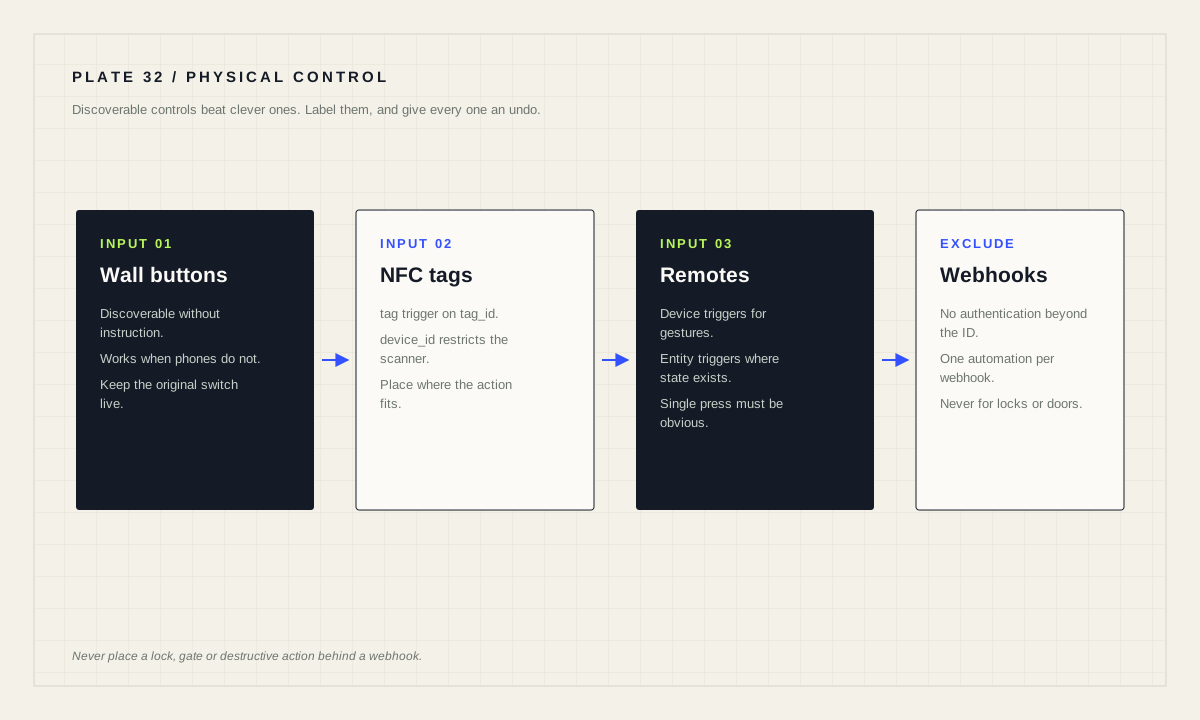
Use a tag trigger for NFC, matching on tag_id and optionally restricting to a specific device_id so the same tag can mean different things in different rooms. Use device triggers for remotes and buttons that expose press events without a persistent state, and entity triggers where a state exists. Never put a consequential action behind a webhook: the documentation says plainly not to use webhooks for destructive or safety-relevant actions such as unlocking a lock or opening a garage door.
Why physical controls still win
A wall switch has properties no dashboard matches. It is discoverable without instruction. It works for a visitor, a child, or someone whose phone is upstairs. It has one function, in one place, and it does not depend on a network.
Automation should extend that quality rather than replace it. Adding a button beside the door that runs a leaving routine is a better design than a dashboard card nobody outside the household will ever find. Keeping the original switch functional alongside it is better still.
The rule of thumb: if a routine matters to more than one person, it needs a physical control. If it matters only to you, a dashboard or a voice command is fine.
NFC tags and the tag trigger
A tag trigger fires when a tag is scanned — for example an NFC tag scanned using the Home Assistant Companion mobile application. The minimal form matches a tag_id.
# Any scanner
triggers:
  - trigger: tag
    tag_id: A7-6B-90-5F

# Only when scanned by a specific device
triggers:
  - trigger: tag
    tag_id: A7-6B-90-5F
    device_id: 0e19cd3cf2b311ea88f469a7512c307d

# Multiple tags and multiple scanners
triggers:
  - trigger: tag
    tag_id:
      - "A7-6B-90-5F"
      - "A7-6B-15-AC"
    device_id:
      - 0e19cd3cf2b311ea88f469a7512c307d
      - d0609cb25f4a13922bb27d8f86e4c821
The device_id restriction is the underused feature. Because you can require that a card is scanned by a specific device or scanner, the same tag can produce different behaviour depending on which phone read it — useful for per-person routines and for preventing a shared tag from doing something unintended.
Place tags where the action makes sense: a bedtime tag on the nightstand, a leaving tag by the door, a laundry tag on the machine. A tag stuck somewhere arbitrary becomes a puzzle, and puzzles do not get used.
Device triggers, entity triggers, and which to use
Device triggers encompass a set of events defined by an integration, including state changes of sensors as well as button events from remotes. In contrast to state triggers, device triggers are tied to a device rather than necessarily an entity. To use one, set up the automation through the browser frontend; if you want to use a device trigger in an automation not managed through the frontend, copy the YAML from the trigger widget in the frontend and paste it into your trigger list.
The practical guidance is to prefer entity-based triggers when a persistent state exists, because entities are easier to inspect, easier to move between devices, and easier to diagnose. Reach for a device trigger when the hardware exposes a button press or gesture with no lasting state to observe — which is exactly the case for most remotes and scene controllers.
Where several buttons should lead to the same routine, give the triggers a shared id. Trigger IDs do not have to be unique and can be used to group similar triggers that should all produce the same outcome, which keeps one readable automation instead of five near-copies.
Multi-press, long press, and the patience problem
Many remotes expose more than one gesture per button: single press, double press, hold. These are attractive because one button becomes three, and they are also where household usability quietly degrades.
Two rules keep them workable. First, the single press must be the obvious action — the thing anyone would expect. Extra gestures are for the person who set them up, not for guests. Second, never put a consequential action on a gesture that can be produced accidentally; a hold that unlocks a door will eventually be triggered by a coat sleeve.
Where a device offers both a device trigger and an entity, test which one actually distinguishes the gestures on your hardware. Support varies, and a double press that reports identically to a single press is a design you cannot build on regardless of how the documentation for a different model reads.
Webhooks: convenient, and explicitly not for consequential actions
A webhook trigger fires when a web request is made to /api/webhook/<webhook_id>, and the endpoint is created automatically when you set the ID in a trigger. Webhooks support POST, PUT, HEAD and GET requests, with PUT recommended; GET and HEAD are not enabled by default but can be added through allowed_methods. By default webhook triggers can only be accessed from devices on the same network, controlled by the local_only option.
The documented security guidance deserves quoting rather than paraphrasing. Do not use webhooks to trigger automations that are destructive or that can create safety issues — the documentation's own examples are not using a webhook to unlock a lock or open a garage door. Treat a webhook ID like a password: use a unique, non-guessable value and keep it secret. Do not copy-and-paste webhook IDs from public sources, including blueprints; always create your own. And keep local_only enabled if internet access is not required.
Note also that webhook endpoints do not require authentication other than knowing a valid ID, and that a given webhook can only be used in one automation at a time. Those two facts together explain why the guidance is as firm as it is.
Make the controls discoverable, and reversible
Label things. A tag or button whose purpose is invisible will be used once and then avoided. A small label, or a placement so obvious it needs none, is what turns a clever trigger into a control the household actually uses.
Give every physical trigger an undo. If a button starts a routine, the same button pressed again — or a nearby one — should stop it. People press things twice when nothing appears to happen, and a routine that cannot be interrupted teaches them not to press it at all.
Finally, confirm the feedback loop. Something should change visibly or audibly within a second of a press or a scan. Without that, the honest household response is to press harder, then to give up. A light that acknowledges immediately is worth more than a routine that is elegant and silent.
Physical control review
- Every multi-person routine has a physical control.
- Original switches still work independently.
- NFC tags placed where the action makes sense, and labelled.
device_idused where a tag should mean different things per scanner.- Single press is the obvious action; gestures are extras.
- No consequential action on an accidental gesture.
- No webhook behind a lock, door or anything destructive.
- Immediate feedback on every press, and an undo path.
Source desk
Primary documentation used for this guide. Interface names and behaviors can change; confirm the current page before changing a live installation.
- Automation triggersOfficial tag, device and webhook trigger behaviour plus webhook security guidance.Official source ↗
- TagOfficial tag integration used by NFC scanning.Official source ↗
- Companion app documentationOfficial companion app documentation covering NFC scanning on mobile devices.Official source ↗
Source review completed .
Frequent questions
How do I automate an NFC tag in Home Assistant?
Use a tag trigger matching the tag_id. Tags can be scanned with the Home Assistant Companion mobile application, and you can list multiple tag IDs in one trigger.
Can the same NFC tag do different things on different phones?
Yes. Add a device_id to the tag trigger to only fire when the tag is scanned by a specific device or scanner, and you can supply multiple device IDs.
When should I use a device trigger instead of an entity trigger?
Use a device trigger when hardware exposes a button press or gesture with no persistent state. Prefer entity triggers where a state exists, because entities are easier to inspect and move between devices.
Is it safe to use a webhook to unlock a door?
No. The documentation states that webhooks should not trigger automations that are destructive or can create safety issues, giving unlocking a lock and opening a garage door as examples.
Can I reuse a webhook ID in more than one automation?
No. A given webhook can only be used in one automation at a time, and only one automation trigger can use a specific webhook ID.