Bench answer
The reliable starting point
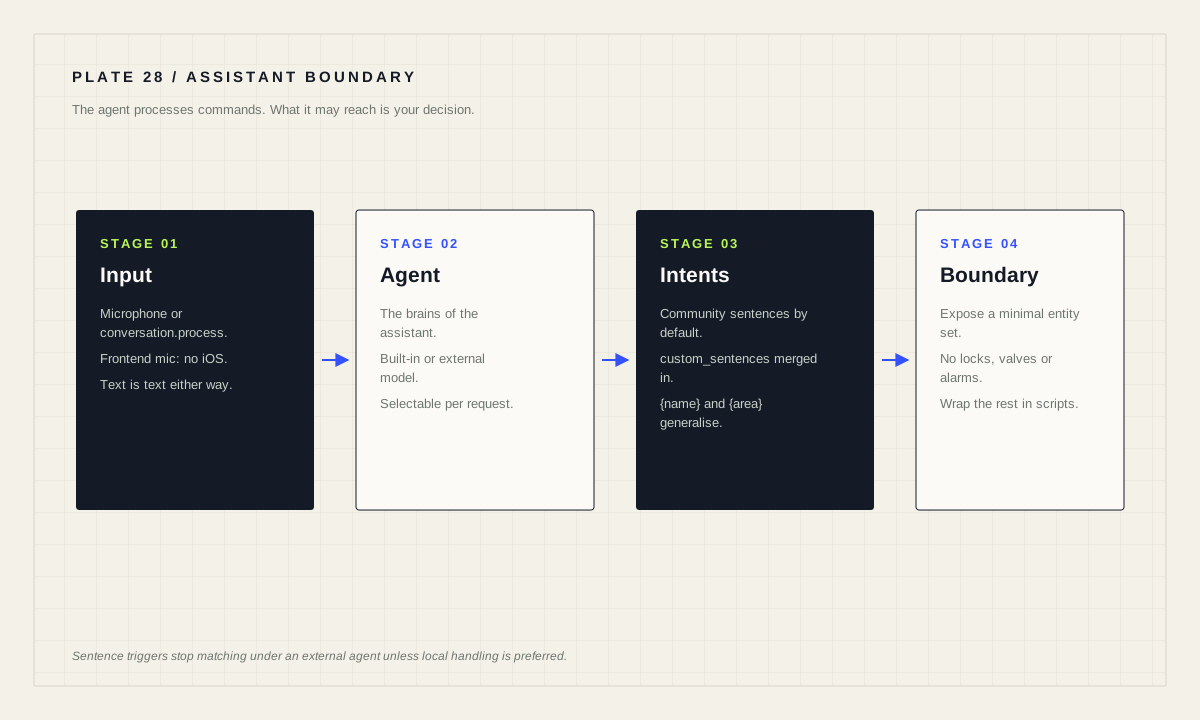
The conversation agent is the brains of the assistant: it processes the incoming text commands. Home Assistant ships a built-in agent using community-contributed sentences, and you can swap in another agent. The critical boundary: sentence triggers work with Home Assistant Assist and will not work with external conversation agents such as OpenAI or Google Generative AI unless “Prefer handling commands locally” is enabled in the conversation agent settings. Expose a minimal entity set and keep consequential devices out of it.
What a conversation agent actually is
The Conversation integration lets you converse with Home Assistant, either by pressing the microphone in the frontend — supported browsers only, and not iOS — or by calling the conversation.process action with transcribed text. That action accepts text, and optionally language, agent_id and conversation_id, where conversation_id either continues an old conversation or starts a new one.
The documentation defines the agent in one line worth quoting to yourself before every design decision: the conversation agent is the brains of the assistant, and it processes the incoming text commands. Everything else — speech to text, text to speech, the microphone hardware — is plumbing around that decision-maker.
By default a collection of community-contributed sentences is supported across a growing list of languages. In English you can say things like “turn on kitchen lights” or “turn off lights in the bedroom” if you have an area named bedroom. That default is deterministic: a sentence either matches or it does not.
Why people swap in a language model, and what it changes
The built-in agent is precise and unforgiving. It matches sentences. If nobody wrote a template for how your household actually phrases a request, nothing happens. A language model as the conversation agent absorbs that variety: paraphrase, filler words, half-remembered device names.
What it changes is the failure mode. A sentence matcher fails visibly — it says it did not understand. A language model fails plausibly: it does something adjacent to what you meant, confidently. For “dim the lounge” that is a shrug. For anything with a lock, a heater or a valve on the other end, it is not.
Treat the swap as an ergonomics decision with a safety consequence, not as an upgrade. The right question is not “is the model good” but “what is the worst thing it can reach, and would I accept that outcome from a well-meaning guest who misheard me?”
The local-handling boundary you must know
This is the fact that surprises people after they switch agents. The trigger documentation states that a sentence trigger fires when Assist matches a sentence from a voice assistant using the default conversation agent, that sentence triggers work with Home Assistant Assist, and that they will not work with external conversation agents such as OpenAI or Google Generative AI unless “Prefer handling commands locally” is enabled in the conversation agent settings.
In practice: every automation you built on a sentence trigger can go quiet the moment you make an external model the default agent. Nothing errors. The phrases simply stop matching, and you will spend an evening debugging automations that are perfectly correct.
Enabling local handling is the fix, and it is also the better architecture. Deterministic phrases handled locally, everything else passed to the model, gives you predictable behaviour for the commands that matter and flexibility for the rest.
Teach it your household's words
Before reaching for a model, consider whether custom sentences solve your problem. You can add sentence templates to teach Home Assistant new phrasings, working with built-in intents or triggering custom actions through custom intents and the intent script integration.
Create a custom_sentences/<language> directory in your Home Assistant config directory, where the language code is for example en. These YAML files are automatically merged and may contain intents, lists or expansion rules.
Extending built-in intents such as HassTurnOn and HassTurnOff is where this becomes powerful. The built-in {name} and {area} lists contain the names of your entities and areas, so a single added phrasing generalises across the whole house.
# config/custom_sentences/en/on_off.yaml
language: "en"
intents:
  HassTurnOn:
    data:
      - sentences:
          - "engage [the] {name}"
      - sentences:
          - "engage [all] lights in [the] {area}"
        slots:
          name: "all"
          domain: "light"
  HassTurnOff:
    data:
      - sentences:
          - "disengage [the] {name}"
For a response rather than an action, a custom intent paired with an intent_script entry can speak a value back — the documentation's example answers an outside-humidity question by rendering a sensor state into speech. More complex actions, including performing actions and firing events, can be done in intent_script as well.
Expose a minimal, deliberate entity set
Whatever agent you choose, the exposure list is the real control surface. An assistant can only act on what it can see, so the shortest path to a safe assistant is a short list.
Include lights, media players, scenes and scripts you would happily let a guest operate. Exclude locks, garage doors, gates, alarm systems, water valves, heaters and anything that could injure someone or cost money to undo. If a device must be reachable by voice, wrap it in a script that includes a confirmation step rather than exposing the raw entity.
Name entities and areas the way your household speaks. “Kitchen lights” beats “Light Kitchen Ceiling 1” for every agent, deterministic or generative. Consistent area names also make the {area} pattern above work properly.
Sentence triggers support wildcards such as {album} and inline number ranges such as {0..100:brightness}, which match digits and words alike. These are useful, and they are also a reminder that spoken input is free text: design as if the wrong words will arrive eventually, because they will.
Privacy, cost and the honest trade
An external conversation agent means the words spoken in your home travel to a third party. That is not automatically unacceptable, but it is a household decision rather than a technical one, and it deserves saying out loud to the people who live there.
A locally hosted model keeps the words at home, at the cost of hardware that can run it. If you are considering this, revisit the hardware question honestly: this is the workload most likely to make a minimum-specification board inadequate, and the assistant will feel slow rather than broken.
Either way, keep an ordinary path to every function. Voice is an interface, not an infrastructure. A house where the lights can only be changed by talking to a service is more fragile than the one it replaced.
Assistant safety gate
- Exposed entity list reviewed; locks, valves, alarms and heaters excluded.
- Consequential actions wrapped in scripts with confirmation.
- “Prefer handling commands locally” enabled if an external agent is default.
- Every sentence trigger re-tested after the agent change.
- Entity and area names match how the household speaks.
- Privacy trade discussed with everyone who lives there.
- Manual control still available for everything voice can reach.
Source desk
Primary documentation used for this guide. Interface names and behaviors can change; confirm the current page before changing a live installation.
- ConversationOfficial conversation agent, custom sentences and intent extension behaviour.Official source ↗
- Automation triggersOfficial sentence trigger behaviour and the local-handling requirement for external agents.Official source ↗
- Voice assistantsOfficial Assist documentation for pipelines and voice hardware.Official source ↗
Source review completed .
Frequent questions
What is a conversation agent in Home Assistant?
The conversation agent is the brains of the assistant: it processes the incoming text commands. It can be selected per request with the agent_id attribute of conversation.process.
Do sentence triggers work with an external AI agent?
Not by default. Sentence triggers work with Home Assistant Assist and will not work with external conversation agents such as OpenAI or Google Generative AI unless Prefer handling commands locally is enabled in the conversation agent settings.
How do I teach Home Assistant new phrases?
Create a custom_sentences directory for your language code inside your config directory and add YAML sentence templates. The files are merged automatically and may contain intents, lists or expansion rules.
Can I extend the built-in turn on and turn off commands?
Yes. You can extend built-in intents such as HassTurnOn and HassTurnOff, and use the built-in {name} and {area} lists so new phrasings generalise across your entities and areas.
Which devices should not be exposed to a voice assistant?
Anything whose misinterpretation is consequential: locks, garage doors, alarms, water valves and heaters. Where voice access is needed, wrap the action in a script with a confirmation step.