Bench answer
The reliable starting point
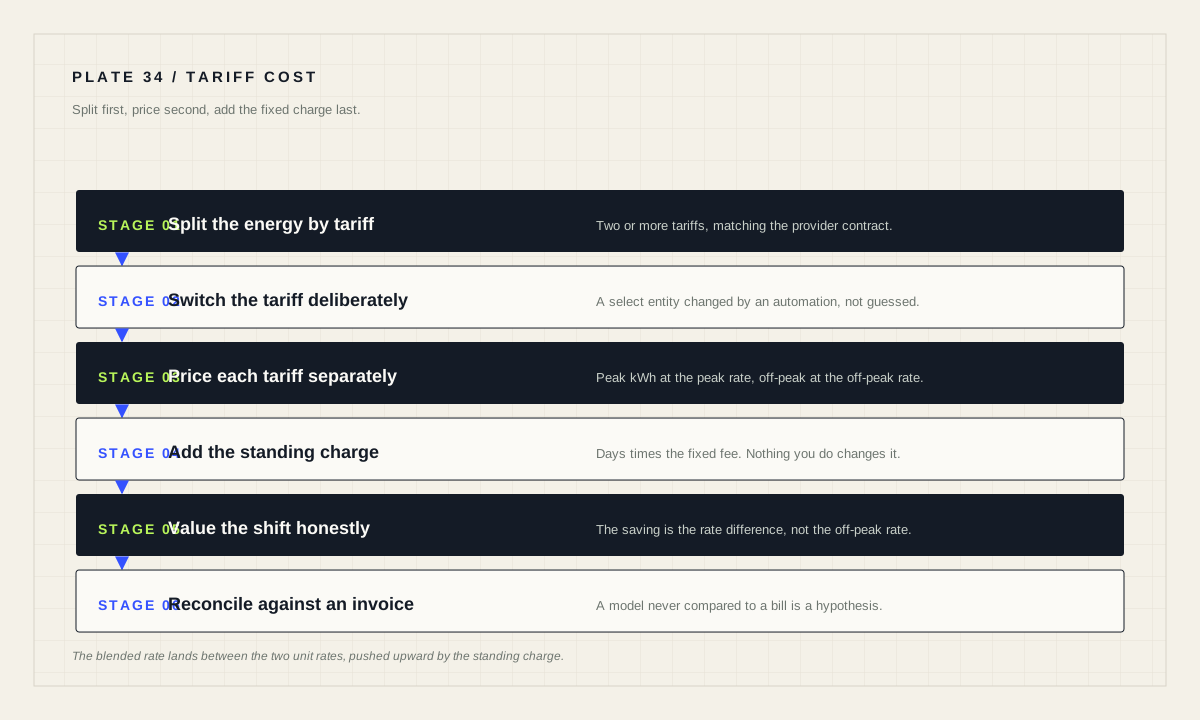
If you are not reading cost directly from your utility, Home Assistant needs the energy split by tariff first. The energy documentation is direct about this: you need Home Assistant to split your energy measurements into two or more tariffs in accordance with your utility provider contract, and the utility_meter integration is how you do it. Once the split exists, cost is arithmetic on your own contract rates — peak kWh times peak rate, plus off-peak kWh times off-peak rate, plus any standing charge times the number of days.
Why the split has to come first
Time-of-use pricing is now common, and the Home Assistant documentation explains the reason from the utility's side: it has become popular for energy utilities to split the price of energy based on time of the day, in order to incentivise consumers to shift their power needs towards times where the grid has lower loads. Peak periods are when everyone consumes and the cost is higher; off-peak periods are when energy is abundant but unused, and cheaper.
That means a single monthly kWh figure cannot be priced. Six hundred kilowatt-hours at “the electricity rate” is meaningless if three hundred of them were bought at one price and three hundred at another. The number will be wrong, and worse, it will be wrong in a direction that changes with your behaviour, so the error moves every month and never looks like an error.
The energy FAQ states the requirement without hedging: if you are using a third-party device, meaning you are not reading directly from your utility meter or from the utility provider's cloud service, you need Home Assistant to split your energy measurements into two or more tariffs in accordance with your utility provider contract. If your utility already gives you a cost figure, use theirs. If not, split first.
Get the split with utility_meter tariffs
The utility_meter integration exists for this. The documentation describes it plainly: some utility providers have different tariffs according to time or resource availability, and the utility meter enables you to define the various tariffs supported by your utility provider and accounts for your consumption accordingly.
Defining tariffs on a meter produces a separate accumulating sensor per tariff, which is exactly what the cost arithmetic needs. The documentation's own example configures both a daily and a monthly meter over the same source with peak and offpeak tariffs.
utility_meter:
  daily_energy:
    source: sensor.energy
    name: Daily Energy
    cycle: daily
    tariffs:
      - peak
      - offpeak
  monthly_energy:
    source: sensor.energy
    name: Monthly Energy
    cycle: monthly
    tariffs:
      - peak
      - offpeak
Switching between them is a deliberate action, not something the meter guesses. When tariffs are defined a new entity will show up indicating the current tariff, and to change the tariff the user must perform an action, usually through an automation that can be based on time or other external sources such as a REST sensor. A time-based automation calling select.select_option on that entity is the ordinary pattern.
Get the switching times exactly right, including whatever your contract does at weekends and public holidays. An automation that flips to peak an hour late does not produce a small error; it moves an hour of consumption into the wrong bucket every single day, and the resulting cost model will be quietly and permanently wrong.
Price the period
With the tariff sensors reading real numbers, the cost is arithmetic. Enter the kWh from each tariff meter for the same period, the unit rates from your contract and the standing charge if you have one.
Planning tool
Peak and off-peak cost calculator
Every figure below is yours: read the kWh split from a tariff-aware meter and the rates from your own contract. Nothing here assumes a market price — the values pre-filled below are placeholders so the tool has something to show, and every one of them should be replaced with your own.
The blended rate deserves a second look, because it is the figure most people quote and the one most often misunderstood. It is the total divided by the total kilowatt-hours, so it sits between the two unit rates, weighted by how much you used on each, and it is pushed upward because it includes the standing charge. It is a useful number for comparing one month against another. It is a bad number for deciding whether to run the dishwasher now, because the marginal cost of the next kilowatt-hour is the tariff rate, not the blend.
The standing charge is not a rounding error
A fixed daily fee behaves differently from everything else on the bill: it does not respond to anything you do. If you halve your consumption, the standing charge is unchanged, so the proportion of the bill you can actually influence is smaller than the headline suggests. The calculator separates it for exactly this reason.
This has a direct consequence for automation projects. A routine that saves a genuine amount of energy can look disappointing against a bill dominated by fixed charges, and the honest response is to say so rather than to quietly compare against the wrong baseline. Judge energy automations on the energy cost line, then note the fixed cost separately.
Not every contract has a standing charge, and some bundle it differently or apply capacity charges based on peak demand rather than total consumption. The calculator handles a simple daily fee; if your contract does something else, the arithmetic here is a starting point and not a substitute for reading it.
What shifting load is actually worth
The saving from moving a kilowatt-hour off peak is the difference between the two rates, not the off-peak rate. That is a smaller number than most people expect, and it is the number the calculator reports, along with the same shift projected over a year so the decision is made at the scale it actually operates on.
Then be honest about which loads are genuinely flexible. Water heating, vehicle charging, pool pumps and a dishwasher that can run at three in the morning are real candidates. A fridge is not: it runs when it needs to. Lighting is not: you need it when you need it. Shifting a load that was never flexible produces a spreadsheet saving and a household argument.
Comfort and noise are part of the constraint set. A washing machine finishing in the small hours means damp laundry sitting until morning, and a heat pump running hard at four is audible in a bedroom above it. If a shift only survives on paper, it is not a saving, it is a plan to be annoyed monthly.
The other reason to compute this before automating: it tells you whether the project is worth building at all. If moving every genuinely flexible load saves a trivial amount, the honest conclusion is to spend the evening on something else. That is a legitimate outcome of a calculation and a better one than a fragile automation nobody trusts.
Reconcile against a real invoice
A cost model that has never been compared to an invoice is a hypothesis. Take one complete billing period, run the numbers, and compare against what the utility actually charged. Small disagreement is normal and comes from meter read timing and rounding. Large disagreement means something structural is wrong: a tariff switching at the wrong time, a sensor counting the wrong direction, a unit off by a factor of a thousand, or a contract term you have not modelled.
Fix the source rather than adding a correction factor. A fudge factor makes the dashboard agree with the invoice this month and hides the real fault until the next tariff change makes it obvious again.
Cost model acceptance checklist
- Energy is split by tariff before any price is applied.
- Tariff switching times match the contract, including weekends and holidays.
- The kWh figures and the day count cover the same period.
- The standing charge is shown separately from energy cost.
- Shift savings use the rate difference, not the off-peak rate.
- One full period reconciled against a real invoice.
- Discrepancies fixed at the source, never with a correction factor.
Source desk
Primary documentation used for this guide. Interface names and behaviors can change; confirm the current page before changing a live installation.
- Utility MeterOfficial tariff definition, the peak and offpeak example, and the tariff select entity.Official source ↗
- Electricity gridOfficial explanation of time-of-day pricing, peak and off-peak periods, and meter reading methods.Official source ↗
- Energy FAQOfficial requirement to split measurements into two or more tariffs when not reading from the utility.Official source ↗
- Home energy managementOfficial Energy dashboard concepts and source types.Official source ↗
Source review completed .
Frequent questions
How do I split energy into peak and off-peak in Home Assistant?
Use the utility_meter integration with a tariffs list. It enables you to define the various tariffs supported by your utility provider and accounts for your consumption accordingly, producing a separate accumulating sensor per tariff.
How does Home Assistant know which tariff is active?
It does not decide on its own. When tariffs are defined a new entity appears indicating the current tariff, and changing it requires an action, usually from a time-based automation calling select.select_option.
Why does the blended rate not match either tariff rate?
Because it is the whole period's cost divided by the whole period's kilowatt-hours. It lands between the two unit rates, weighted by how much you used on each, and any standing charge pushes it upward. Use the tariff rate, not the blend, for marginal decisions.
What is shifting a load off peak actually worth?
The difference between the peak and off-peak rate, multiplied by the kilowatt-hours you genuinely move. It is not the off-peak rate, and it only counts for loads that can really wait.
Do I need to split tariffs if my utility already reports cost?
No. The requirement to split into two or more tariffs applies when you are using a third-party device rather than reading directly from your utility meter or the provider's cloud service. If the utility gives you cost, prefer theirs.