Bench answer
The reliable starting point
Power in watts or kilowatts is an instantaneous rate. Energy in watt-hours or kilowatt-hours accumulates over time. Configure the Energy dashboard with compatible energy sensors, verify device class, state class, units and direction, then compare totals against a trusted meter. If only power is available, Home Assistant’s Integral helper can estimate energy—but source quality and the integration method matter.
Do not mix power with energy
A 2 kW heater describes a rate. If it draws that rate for half an hour, it uses about 1 kWh of energy. The Energy dashboard accounts for energy over intervals, while power sensors help explain what is happening now. Treat cost as a third layer: a tariff applied to valid imported or exported energy, not a guess derived from one momentary reading.
Inspect the entity in Developer tools. Confirm its unit, device_class, state_class, whether it is cumulative, and whether it resets. A sensor named “total” may still have the wrong semantics. Never multiply a current power value by 24 hours and present the result as measured daily energy.
Map import, export, production, storage and loads
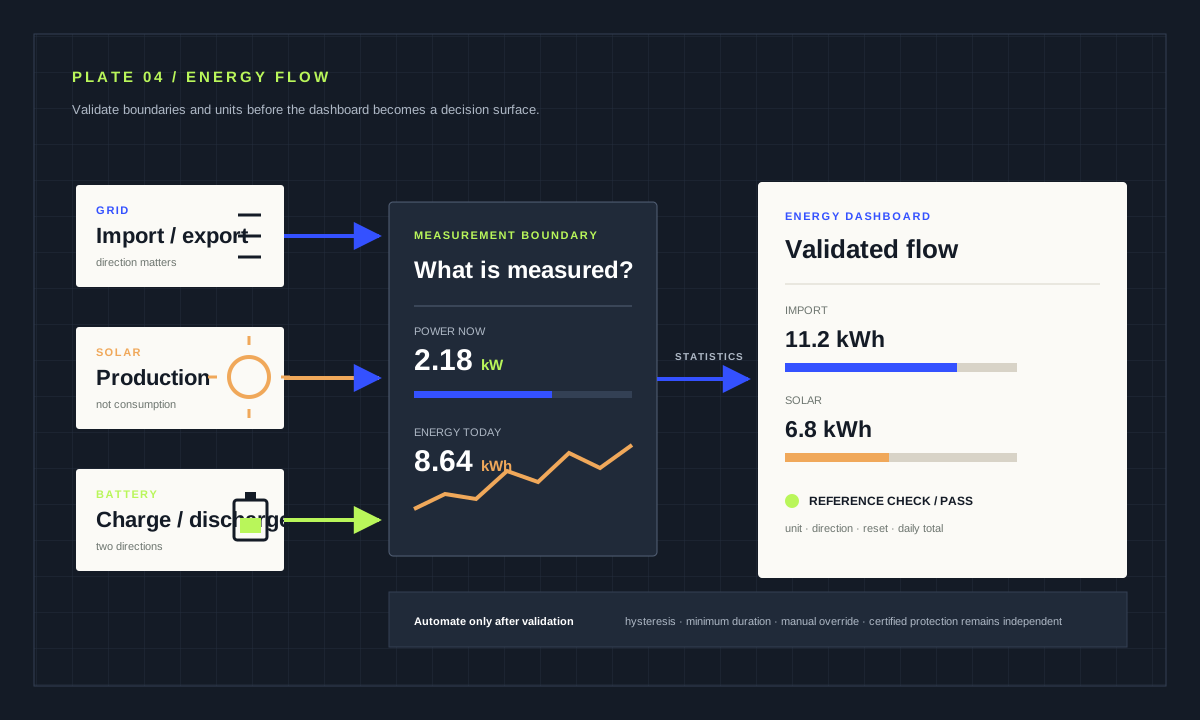
Start with one trusted grid-import sensor. Add export only if the meter or inverter distinguishes direction correctly. Solar production is not the same as household consumption. A battery adds separate charge and discharge flows. Individual-device energy should be a subset of total consumption, not added again to the grid figure.
Draw the boundaries before configuring the dashboard: utility meter, inverter, battery and monitored devices. Label where each sensor sits and which direction is positive. Compare a full day with the utility or inverter interface, allowing for update intervals and rounding. Large persistent disagreement usually indicates direction, unit, duplication or reset problems—not a dashboard styling issue.
Configure the Energy dashboard in layers
Under the Energy configuration, add electricity grid consumption first, then return-to-grid, solar, battery, gas, water or device sources only when each source is validated. Home Assistant accepts energy sensors with appropriate units and long-term-statistics properties. Power inputs can be displayed alongside energy where supported, but a W sensor does not become a kWh counter merely by appearing on the same screen.
Give statistics time to accumulate and inspect warnings rather than repeatedly deleting configuration. Note the source entity and last validation date in your own system documentation. When replacing hardware, keep entity continuity only if the new measurement has compatible units, direction and reset semantics.
Convert power to energy only when the source supports it
The Integral helper estimates area under a power curve. It needs a power sensor with reliable timestamps and units, and a method suited to how the signal changes. A frequently sampled smooth load behaves differently from a sparse on/off update. The left, right and trapezoidal methods can produce different estimates around steps.
Set the metric prefix and time unit so the resulting entity reports the energy unit you intend. Compare the result over a representative period with a known energy counter. Missing updates and unavailable intervals cannot be recovered by a prettier formula. Document that an integrated figure is an estimate derived from power.
# Illustrative helper; verify the source unit and sampling first.
sensor:
  - platform: integration
    source: sensor.workshop_power
    name: Workshop energy estimate
    unit_prefix: k
    round: 3
method: leftAudit resets, gaps and impossible values
Plot power and energy together. An energy counter should not fall unless its model permits a reset that Home Assistant can interpret. Watch for negative import, duplicate sensors, a 1000× unit error, flat lines during outages and spikes after reconnection. Compare daily totals over several ordinary and high-load days.
Do not silently clamp or discard suspicious values without preserving a diagnostic. Fix the source, entity configuration or integration when possible. A template that hides bad input can make the dashboard look calm while decisions remain wrong. Cost projections should say whether they include standing charges, export compensation, tax and variable tariffs.
Measurement acceptance checklist
- Power and energy units are not interchanged.
- Import, export, production and battery direction are mapped.
- Resets and unavailable intervals are understood.
- Daily totals were compared with a trusted reference.
- Automations have limits and do not assume perfect data.
Automate reversible loads, keep safety independent
Once measurement is stable, use conservative thresholds and minimum durations to shift flexible loads, notify about unusual standby demand or prefer surplus solar. Include a maximum run time and a manual override. Avoid rapid switching around a threshold by using hysteresis or separate start and stop levels.
Home Assistant is not an electrical protection device. Overcurrent, ground-fault, thermal and equipment safety must remain with certified hardware. Mains meters, current transformers and distribution-board equipment can expose lethal voltage and fire risk; use listed equipment and a qualified electrician as required locally. This guide intentionally provides no wiring procedure.
Source desk
Primary documentation used for this guide. Interface names and behaviors can change; confirm the current page before changing a live installation.
- Home energy managementOfficial Energy dashboard concepts and source types.Official source ↗
- Integral integrationOfficial power-to-energy integration methods and configuration.Official source ↗
- Sensor entityOfficial device class and state class semantics.Official source ↗
Source review completed .
Frequent questions
What is the difference between W and kWh?
Watts and kilowatts describe power at a moment. Watt-hours and kilowatt-hours describe energy accumulated over time. A 2 kW load running for half an hour uses about 1 kWh.
Can I add a power sensor directly to the Energy dashboard?
Power may be shown alongside energy in supported fields, but accounting requires an appropriate accumulated-energy sensor. Check the official dashboard requirements and entity properties.
When should I use the Integral helper?
Use it when you have a trustworthy power sensor but no energy counter. Choose units and method deliberately, then validate the estimate against a known reference.
Why does my energy total suddenly drop?
The source may reset, change unit, become unavailable or report a bad sample. Inspect entity history and statistics; do not hide the change until you understand the source behavior.
Can Home Assistant replace electrical protection?
No. Automation and dashboards do not replace breakers, ground-fault protection, thermal cut-outs or certified control systems. Mains work belongs with qualified people under local rules.