Bench answer
The reliable starting point
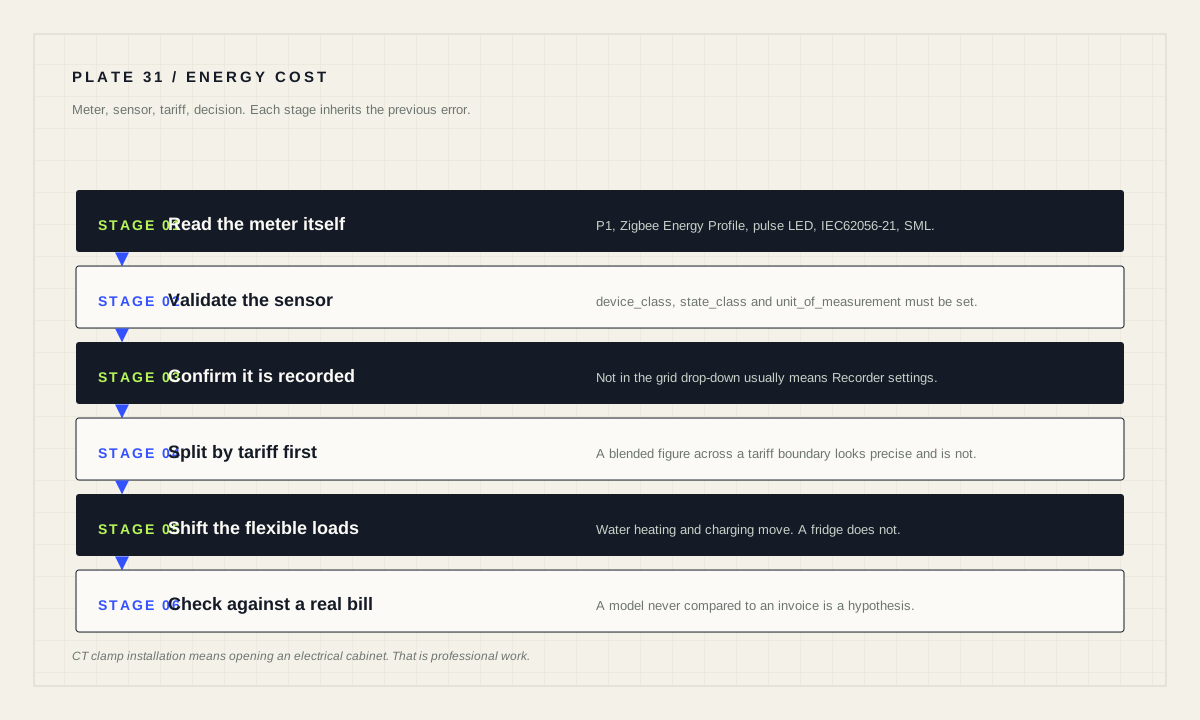
Get the data from the meter itself where you can: a P1 port, a utility Zigbee Energy Profile device, a pulse counter on the meter LED, an infrared IEC62056-21 reader, or SML. If you integrate sensors manually through MQTT or Template, you must set device_class, state_class and unit_of_measurement. If a sensor will not appear in the grid consumption drop-down, check that it is being recorded in Recorder settings. CT clamp installation means opening an electrical cabinet — that is professional work.
Read the meter, not an estimate of it
Energy management is about knowing how much energy you are consuming, where it comes from and where it goes. The best source is the electricity meter that sits between your house and the grid, and in several countries these meters expose standardized local readouts.
The P1 port is a standardized port in the Netherlands, Belgium and Luxembourg; a P1 reader connects to it and receives real-time information. The Zigbee Energy Profile is a wireless energy standard available in some meters in the US, UK, Canada and Australia — the documentation is careful to note this is not “normal” Zigbee as implemented by Home Assistant, requires special certified hardware, and often requires the connection to be provisioned by your utility.
Where no data port exists, indirect reading works. Many meters, including older ones, have an LED that flashes as energy passes — for example one flash per 1/1000th kWh — and timing between flashes gives consumption. IEC62056-21 is a common protocol read over an infrared port. In countries such as Germany, SML is typical. In the US and Canada many electricity, gas and water meters broadcast readings using AMR or ERT protocols which can be received with an inexpensive RTL-SDR dongle, though compatibility varies by meter model and region and some meters use encryption.
CT clamps: useful, and not a software task
Current transformer clamp sensors measure energy use by looking at the current passing through an electrical wire, which makes it possible to calculate consumption. Home Assistant supports off-the-shelf CT clamp devices and do-it-yourself builds alike.
The documentation attaches an unambiguous warning, and it is repeated here without softening: installing CT clamp sensor devices requires opening your electrical cabinet; this work should be done by someone familiar with electrical wiring and may require a licensed professional in some regions.
Treat that as the boundary of this guide. Choosing which sensor to buy, and what to do with its data afterwards, is within scope. Fitting it is not, and no configuration guide can make an electrical cabinet safe to open.
Sensors that the energy features will actually accept
Manually integrated sensors have requirements. If you integrate sensors yourself — for example through the MQTT or Template integrations — make sure you set and provide the device_class, state_class and unit_of_measurement for those sensors. Without them the value may display fine and still be unusable by the energy features.
The documented troubleshooting step for the most common complaint is equally specific: if you are unable to select your energy or power sensor in the grid consumption drop-down, make sure its value is being recorded in the Recorder settings.
Those two checks resolve most “my sensor exists but nothing works” situations. Do them before rebuilding anything, and before concluding that a device is unsupported.
# Manual sensor requirements before wiring cost on top

device_class        : energy (or power, as appropriate)
state_class         : set explicitly
unit_of_measurement : set explicitly, and consistent

Recorder            : sensor value is being recorded
Drop-down           : sensor appears under grid consumption
Sanity : daily total compares sensibly with the billPeak, off-peak and why tariffs exist
Energy prices can differ based on a schedule or change according to market price. It has become popular for utilities to split the price of energy by time of day in order to incentivise consumers to shift their power needs towards times when the grid has lower loads. These periods are commonly called Peak and Off-Peak: peak matches times when everyone is consuming energy, off-peak when energy is abundant but little used, and peak energy is more expensive than off-peak.
Home Assistant supports splitting energy usage into multiple tariffs; the energy FAQ documents that procedure. Set this up before you attach any price, because a single blended figure across a tariff boundary is worse than no figure — it looks precise and is not.
Resist the urge to hard-code prices into an automation. Rates change, standing charges exist, and a number typed into a YAML file six months ago is a slowly rotting fact. Keep prices in helpers you can update in one place, and treat any calculated cost as an estimate you can explain rather than a bill you can defend.
Shifting load is where the value actually is
Once tariffs are represented, the useful automation is not reporting — it is moving flexible consumption into cheaper periods. Flexible means anything whose timing nobody notices: water heating, dishwashers and washing machines started deliberately, battery charging, pool pumps.
Inflexible means anything with a comfort or safety consequence attached to its timing. Heating a home is only partly flexible; a fridge is not flexible at all. Sorting devices into these two groups honestly is more valuable than any dashboard, because it tells you where the achievable saving actually lives.
Build the shift as an intent rather than a schedule. “Start when the tariff is off-peak and the machine is loaded” survives a tariff change; “start at 01:00” does not. And never start an unattended appliance automatically without the household agreeing to it — timing is a software decision, but a running washing machine at two in the morning is a domestic one.
Solar, batteries and keeping the model honest
The energy documentation covers solar panels, home batteries, gas, water and individual devices as separate topics, each with its own integration path. The reason they are separate is that each introduces its own direction of flow, and mixing them carelessly is how a dashboard ends up double-counting.
Keep the mental model strict. Production is not consumption. Export is not saved money at the same rate as avoided import. A battery adds separate charge and discharge flows that are neither. Individual-device energy should be a subset of the household total, not an addition to it.
Whatever you build, validate it against reality periodically: compare a daily total with the meter reading and, when a bill arrives, with the bill. A model that has never been checked against an invoice is a hypothesis. That comparison is also the only honest way to answer whether any of this saved money.
Energy cost readiness
- Data source chosen and, where possible, read from the meter itself.
- Any CT clamp installation done by a qualified person.
- Manual sensors carry device_class, state_class and unit_of_measurement.
- Sensors confirmed as recorded in Recorder settings.
- Tariff split configured before any price is applied.
- Prices stored in helpers, not hard-coded in automations.
- Flexible and inflexible loads listed separately.
- Totals compared against a real meter reading and a real bill.
Source desk
Primary documentation used for this guide. Interface names and behaviors can change; confirm the current page before changing a live installation.
- Integrating your electricity gridOfficial meter reading methods, tariff explanation, sensor requirements and troubleshooting.Official source ↗
- Home energy managementOfficial energy management overview covering solar, batteries, gas, water and devices.Official source ↗
- Energy FAQOfficial procedure for splitting consumption by tariffs.Official source ↗
Source review completed .
Frequent questions
What is the best way to get grid energy data into Home Assistant?
Directly from the electricity meter where possible: a P1 port in the Netherlands, Belgium and Luxembourg, a utility-provisioned Zigbee Energy Profile device, a pulse counter on the meter LED, an infrared IEC62056-21 reader, or SML.
What must I set on a manually integrated energy sensor?
If you integrate sensors using MQTT or Template, you must set and provide the device_class, state_class and unit_of_measurement for those sensors.
Why can I not select my sensor in the grid consumption drop-down?
Make sure the sensor's value is being recorded in the Recorder settings.
What are peak and off-peak tariffs?
Utilities split energy price by time of day to encourage shifting demand to times when the grid has lower loads. Peak periods, when everyone is consuming, are more expensive than off-peak periods.
Is installing a CT clamp a do-it-yourself job?
The documentation states that installing CT clamp sensor devices requires opening your electrical cabinet, should be done by someone familiar with electrical wiring, and may require a licensed professional in some regions.