Bench answer
The reliable starting point
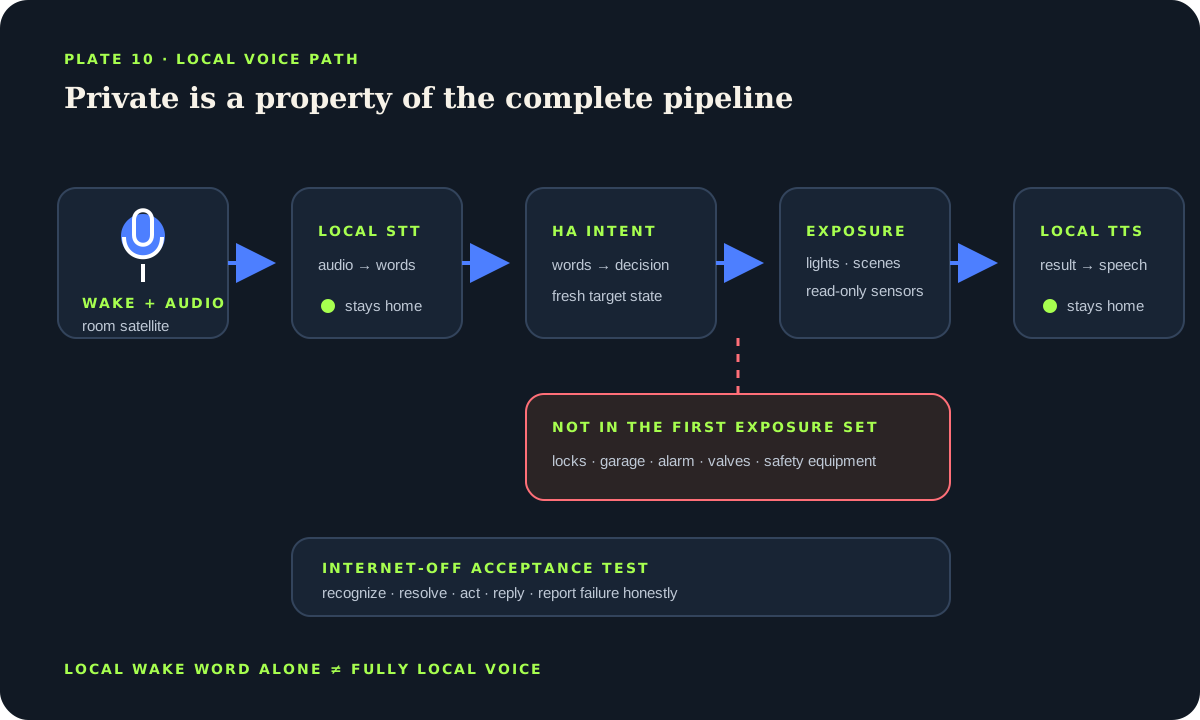
Use Home Assistant Assist and select a pipeline whose speech-to-text and text-to-speech components both run locally; a local wake word alone does not make the whole path local. Start on the Companion app before adding room satellites. Assign clean names and areas, expose only a small set of low-risk lights, scenes and sensors, and verify every phrase in the Assist debug view or traces. Keep locks, garage doors, alarms, valves and safety-related equipment unexposed unless a rigorously reviewed design provides authentication, confirmation and an ordinary manual path.
Name every stage in the voice pipeline
A voice satellite captures audio after a button or wake word. Speech-to-text converts audio into words. Home Assistant’s conversation or intent handling maps those words to a supported request. An action targets exposed entities. Text-to-speech produces the spoken reply. The Assist pipeline configuration selects the language and components for these jobs.
A system is fully local only when the active audio, speech-to-text, intent and text-to-speech path stays on hardware you control at home. A local microphone with cloud speech recognition is not fully local. Conversely, Home Assistant documents that Assist can run entirely on local hardware when local engines are selected. Record which engine serves each stage instead of relying on a marketing phrase.
Local processing still stores or processes sensitive household data on the selected devices. Protect Home Assistant accounts, backups, diagnostics and satellite access. Privacy improves when audio need not leave the home, but it does not remove the need for security and careful exposure.
Prove the language model on a phone first
Begin with the Assist interface in the Home Assistant Companion app or browser. This removes wake-word acoustics and satellite networking from the first test. Select the intended pipeline and language, then try a narrow set of commands such as turning on one lamp, activating a scene and asking for a temperature. If text requests fail, a more expensive microphone will not fix entity naming or exposure.
Use the Assist debug tools and Home Assistant traces to see transcribed text, matched intent, target and error. Separate “heard the wrong words” from “understood the words but selected no entity.” Adjust one layer at a time. Keep a written acceptance phrase list for the household language and accents instead of testing only the installer’s voice.
Do not train people to include secrets or access codes in spoken phrases. Rooms have visitors, open windows, televisions and recordings. Voice is a convenient interface, not proof of identity unless the entire design explicitly provides a trustworthy authentication method.
Make names, areas and aliases unambiguous
Assist resolves natural language through entity names, aliases, areas and exposed attributes. Assign devices to accurate areas and use short spoken names that differ clearly. “Table lamp” and “desk lamp” are easier to distinguish than three entities called “Main light.” Avoid aliases that collide with scene names or broad areas.
Test singular, plural and ordinary household phrasing. A room-aware satellite can make “turn on the lights” convenient, but confirm how the satellite’s area is assigned and what target the current version selects. Never let a broad label or area silently include a newly added consequential device. Review exposure whenever an integration creates entities or a device moves rooms.
Responses should repeat enough context to catch mistakes: “Turning on the desk lamp” is safer than “Done.” For commands that change several devices, use a deliberately named scene rather than a vague phrase that dynamically targets an entire floor.
Expose the minimum useful entity set
Entity exposure is the main safety boundary. Start with low-risk lights, scenes and read-only sensors. Exclude hidden helpers, diagnostic entities and devices whose accidental operation could injure, trap, unlock, flood, overheat or disable protection. Review the Assist or voice-assistant exposure settings directly; dashboard visibility is unrelated and hiding a card does not remove an entity from voice.
Keep locks, garage doors, alarms, water valves and high-power equipment out of the first release. If a later use case genuinely requires one, perform a consequence review: who can speak within range, whether the request can originate from media, what confirmation or authentication exists, what happens with a false positive, and how the physical safeguard behaves. In many homes, leaving the entity unexposed is the professional decision.
Add satellites as room infrastructure
After the text and phone pipeline passes, add one satellite in a quiet room. Place it away from televisions, loudspeakers, fans and hard corners that create echo. Confirm microphone mute behavior, wake feedback, volume and the physical method for stopping an unwanted response. A satellite used by guests needs obvious state cues and an explanation of what it can control.
Measure success in the intended position at normal speaking volume. Test background conversation, similar wake sounds, music, two speakers, an open doorway and network loss. False wakes matter even when the following intent fails because they affect privacy and trust. Missed wakes tempt people to shout or repeat commands, which is not an acceptable long-term interface.
Local speech engines consume compute and memory. Response time depends on hardware, language model and concurrent work. Choose the model that meets intelligibility and latency on the actual Home Assistant host or companion server. Do not place critical automation timing behind a voice pipeline.
Verify local operation and safe failure
Disconnect the internet during a planned window and repeat the accepted phrases. Confirm that speech recognition, intent handling and spoken responses still work; if one stage stops, the selected pipeline was not fully local or had an undeclared dependency. Then test Home Assistant restart, satellite reconnect, muted microphone, unavailable target and an ambiguous entity name.
Inspect the result from the physical device, not only the spoken reply. The system may understand the command but fail to change an unavailable entity. Responses should disclose failure rather than announce success optimistically. Preserve wall switches and ordinary app control, and make sure the household knows how to mute or power down the voice surface.
ACCEPT: Turn on the desk lamp → one low-risk light
ACCEPT: Activate reading scene → one named scene
ACCEPT: What is the living-room temperature? → read-only answer
REJECT: Unlock the front door → entity not exposed
REJECT: Open the garage → entity not exposed
OUTAGE: Repeat all accepted phrases with internet disconnected
Local voice acceptance checklist
- STT, intent handling and TTS are identified as local components.
- Phone-based text and voice tests pass before a satellite is added.
- Names, areas and aliases select only the intended target.
- Only a minimal set of low-risk entities is exposed.
- Internet-off, false-wake, unavailable and restart cases are verified.
Source desk
Primary documentation used for this guide. Interface names and behaviors can change; confirm the current page before changing a live installation.
- AssistOfficial Home Assistant voice overview and supported surfaces.Official source ↗
- Set up a fully local voice assistantOfficial local pipeline prerequisites and setup path.Official source ↗
- Exposing entities to AssistOfficial entity-exposure and alias workflow.Official source ↗
- Assist pipelinesOfficial pipeline component and integration documentation.Official source ↗
Source review completed .
Frequent questions
Can Home Assistant voice control run fully locally?
Yes. Home Assistant documents a fully local Assist setup when local speech-to-text and text-to-speech engines and local intent handling are selected. Verify each active pipeline component.
Does a local wake word make the whole voice assistant local?
No. Wake detection is only one stage. Speech recognition or text-to-speech may still use a remote service unless the pipeline explicitly selects local components.
Which entities should I expose first?
Start with a few low-risk lights, scenes and read-only sensors. Exclude locks, garage doors, alarms, valves and safety-related equipment until a separate consequence review justifies otherwise.
Why does Assist control the wrong light?
Check entity names, aliases, areas, satellite area and exposure. Remove ambiguous aliases and test the exact phrase in Assist debug tools before changing microphone hardware.
Is voice recognition proof of who spoke?
No. Ordinary voice commands can be heard or replayed by other people or media. Do not treat a recognized phrase as identity proof or certified access control.