Bench answer
The reliable starting point
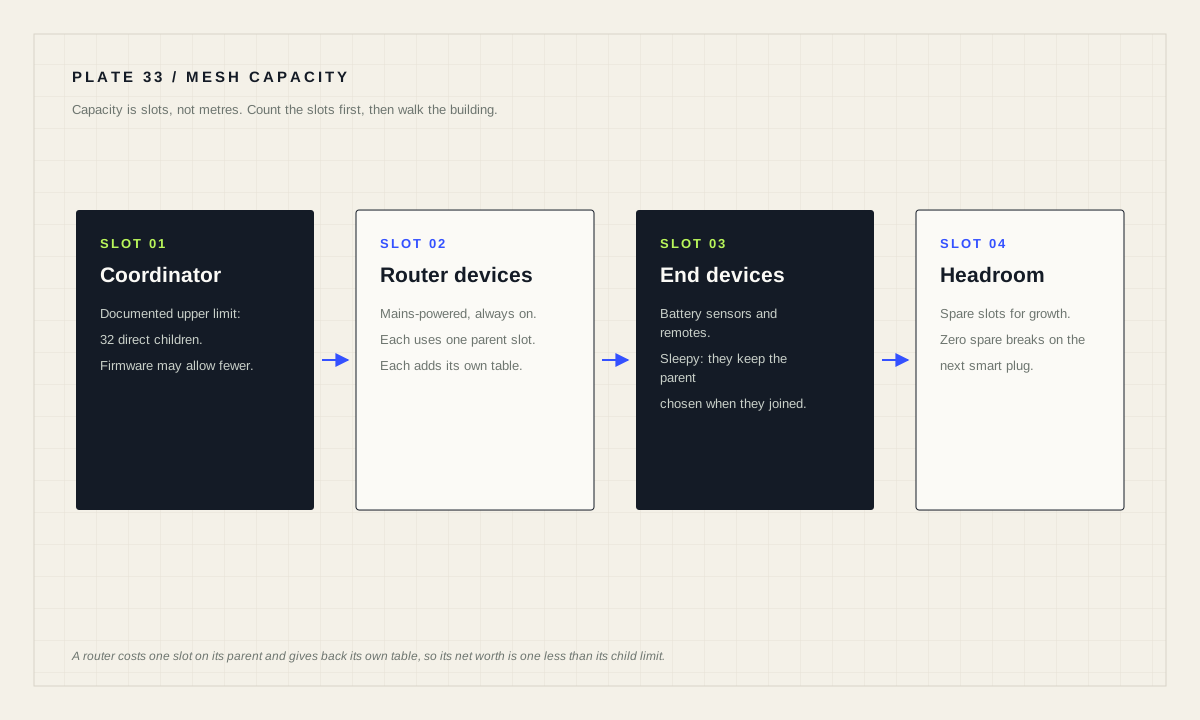
Every Zigbee coordinator limits how many devices may attach to it directly. The ZHA documentation is explicit: the zigpy library has an upper limit that is 32 direct children, while hundreds of devices can still be connected indirectly through router devices. So the planning question is never “how many devices fit” but “how many mains-powered routers do I need before the battery devices have somewhere to attach”. Add the routers first, then the sensors.
Why the coordinator runs out of room
Zigbee devices do not all talk to the coordinator. Each device joins a parent, and that parent keeps a table of the children attached to it. The table is finite. The ZHA documentation puts a number on the ceiling for the coordinator: the zigpy library, which the ZHA integration depends on, has an upper limit that is 32 direct children, but you can still have hundreds of Zigbee devices in total connected indirectly through routes via Zigbee router devices.
The documentation also gives the reasoning, and it is worth internalising because it explains why raising the limit is the wrong instinct. The restriction exists firstly to not overload the Zigbee coordinator, and secondly to encourage your Zigbee network to quickly begin to use a mesh networking topology instead of only a star network topology. A coordinator with every device hanging off it is a single point of congestion and a single point of failure. The limit pushes you toward the shape the protocol was designed around.
This matters practically because the failure is silent and misattributed. You add the thirty-third sensor, it refuses to join, and you spend the evening re-pairing it, moving it closer, changing its battery and reading forum threads about interference. The device is fine. There is simply nowhere to put it.
What a router device actually buys you
A router is a mains-powered device that relays for others. The ZHA documentation describes the effect plainly: router devices help pass messages to other nearby devices in the Zigbee network and therefore can improve range and increase the number of devices you can add. Many mains-powered smart plugs, bulbs and switches are routers whether or not the box says so.
Here is the part people get wrong. A router is itself a device that joins the network, so it consumes one slot on its own parent while contributing its own child table. The net gain from adding a router is therefore one less than its child limit. A router accepting sixteen children is worth fifteen extra devices, not sixteen.
The ZHA documentation works a theoretical example through exactly this arithmetic. A coordinator limited to 32 direct children, with three router devices that each accept 16, gives 32 minus 3 slots left for end devices, which is 29, plus 16 from each of the three routers, for a total device limit of 77. That example is the golden case this site's calculator is tested against, so the planner below reproduces the documentation's own number rather than a number of our invention.
Written as a formula, with C as the coordinator's child limit, k as the number of routers and R as each router's child limit:
- Capacity(C − k) + k × R
- Net gain per routerR − 1
- Routers neededround up (devices − C) ÷ (R − 1)
Documented worked example
-------------------------
coordinator direct-child limit   C = 32
router devices                   k = 3
children accepted per router     R = 16

coordinator slots left for end devices    32 - 3  = 29
capacity contributed by the routers        3 * 16  = 48
                                                   ----
total device limit                                   77

Generalised:
  capacity       = (C - k) + k * R
  net per router  = R - 1
  routers needed  = ceil((devices - C) / (R - 1))
The documentation adds the caveat that matters more than the arithmetic: in practice, you will likely need to add a lot more Zigbee router devices than in this example to extend the coverage of the network to reach that many devices. Capacity is the floor. Coverage usually demands more.
Plan the fleet
Fill in the size of network you want and the child limits your own hardware documents. The planner rounds routers up, because a partial router is not a thing you can buy, and it reports the spare capacity so you can see how close to the edge the plan sits.
Planning tool
Zigbee mesh planner
Enter the size of the network you want and the child limits your own hardware documents. The result is a capacity plan, not a coverage plan — it counts slots, not metres.
Read the spare-capacity line rather than the headline. A plan with zero spare slots is a plan that breaks the next time somebody brings home a smart plug. Growth headroom of twenty to thirty per cent costs one extra router and removes a whole class of future confusion.
Build the mesh before you hang sensors on it
Order of installation changes the outcome, because a device chooses its parent when it joins. The ZHA guidance is to start with mains-powered devices before adding battery-operated ones, and Zigbee networks depend heavily on having multiple router devices to expand coverage and increase device capacity. If you pair twenty battery sensors first and add the routers afterwards, those sensors have already attached to whatever was reachable at the time, often the coordinator itself.
Battery devices are the ones with the least freedom here. The documentation describes them as hardware that is typically battery-powered, such as remotes or motion sensors; they are commonly called sleepy devices because they spend most of their life with the radio off. A sleeping device is not continuously renegotiating its route. It attached once, and it will keep using that parent until something forces it to look again.
So the practical sequence is: install and pair the mains-powered routers, spread across the building rather than clustered near the coordinator, then pair the battery devices in the rooms where they will live. Pairing a sensor next to the coordinator and then carrying it to the far bedroom is the single most common way to create a device that works on the bench and drops out in place.
What this planner deliberately does not know
The calculator counts slots. It has no idea where your walls are. Concrete, foil-backed insulation, metal cabinets, underfloor heating mats and a fish tank between two rooms will all cost you range that no amount of table space replaces. Neither will it tell you about interference from Wi-Fi channels overlapping the Zigbee band, or from a USB 3 port sitting next to the coordinator dongle.
It also does not model hop count. If the plan calls for more routers than the coordinator has direct-child slots, those routers cannot all be direct children of the coordinator; real meshes route through further hops, and the planner flags that case rather than pretending otherwise. Deep chains add latency and add failure modes, so a flatter mesh with well-placed routers beats a long relay every time.
Finally, the numbers are Zigbee numbers. Z-Wave and Thread are different networks with different rules and different limits, and Matter is an application layer that can run over several of them. If you are running more than one radio, plan each separately and read each integration's own documentation for its limits. A device count that is comfortable on one network says nothing about another.
None of this makes the arithmetic useless. It makes it a floor: the minimum number of routers you need for the devices to have somewhere to attach, before coverage, materials and layout push the real number higher.
Verify the plan against the live network
After the routers are installed, check what actually happened rather than trusting the plan. The ZHA integration exposes network visualisation and per-device information showing which devices route through which. Look for battery sensors still attached directly to the coordinator when a router sits closer, for routers with no children at all, and for devices whose last-seen timestamp is drifting.
Re-check after any change that moves radio around: a new coordinator, a firmware update, a router unplugged for the holidays, or furniture that now sits between two rooms. A mesh is a live thing and the topology you designed is not necessarily the topology you have.
Mesh capacity checklist
- Coordinator child limit read from its own firmware documentation, not assumed.
- Router child limit read from the router's documentation, not assumed.
- Router count includes growth headroom, not just today's fleet.
- Mains-powered routers installed and paired before battery devices.
- Routers spread through the building rather than clustered near the coordinator.
- Battery devices paired in the room where they will stay.
- Live topology inspected after installation and after any radio change.
Source desk
Primary documentation used for this guide. Interface names and behaviors can change; confirm the current page before changing a live installation.
- Zigbee Home Automation (ZHA)Official 32-direct-children limit, the router capacity example totalling 77 devices, and mains-powered-first guidance.Official source ↗
- Z-WaveOfficial Z-Wave integration documentation, a separate network with its own rules.Official source ↗
- ThreadOfficial Thread border router and mesh documentation.Official source ↗
- MatterOfficial Matter documentation, an application layer that runs over several transports.Official source ↗
Source review completed .
Frequent questions
How many devices can a Zigbee coordinator handle directly?
The zigpy library that ZHA depends on has an upper limit that is 32 direct children. Hundreds of devices can still be on the network in total, connected indirectly through routes via Zigbee router devices.
Why is there a limit on direct children at all?
The Home Assistant documentation gives two reasons: to avoid overloading the Zigbee coordinator, and to encourage the network to use a mesh topology quickly instead of remaining a star network.
How much capacity does one router device add?
One less than its own child limit, because the router itself occupies a slot on its parent. A router that accepts 16 children is worth 15 extra devices, so a coordinator limited to 32 plus three such routers supports 77 devices in total.
Should I add router devices or battery sensors first?
Routers first. The guidance is to start with mains-powered devices before adding battery-operated ones, because a device chooses its parent when it joins and sleepy battery devices keep that choice.
Does this arithmetic apply to Z-Wave, Thread or Matter?
No. These are different networks with different limits, and Matter is an application layer that can run over more than one of them. Plan each radio separately using its own integration documentation.