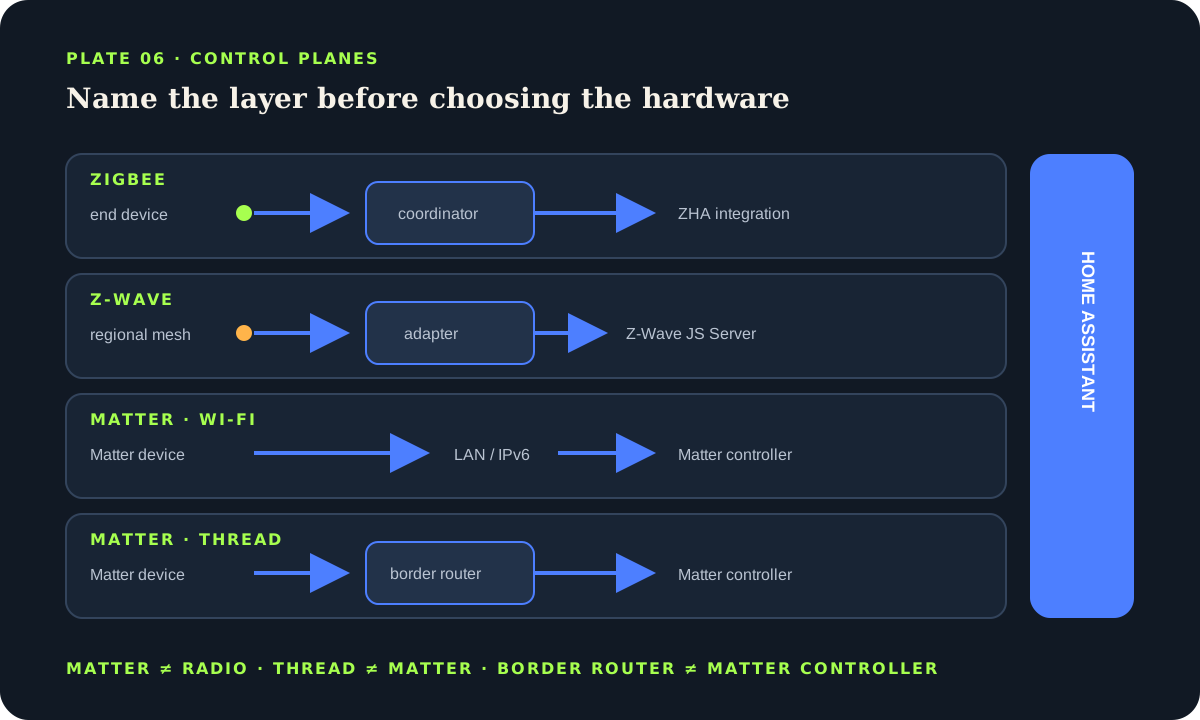
Bench answer
The reliable starting point
Choose from the device behavior and the infrastructure you can maintain. Zigbee through ZHA is a broad, local, low-power mesh; Z-Wave through Z-Wave JS offers a managed sub-GHz mesh and security keys; Matter is an IP-based control standard that can run over Ethernet, Wi-Fi or Thread; Thread is a low-power IPv6 mesh, not a guarantee of Matter support. Confirm the exact Home Assistant entity support, keep radio credentials and backups, and pilot one device before buying a roomful.
Separate protocol, radio, controller and bridge
Start by naming the layer you are discussing. Zigbee combines a device protocol with a low-power radio mesh; Home Assistant’s ZHA integration connects that mesh through a compatible coordinator. Z-Wave is another mesh ecosystem, normally connected through a supported adapter, the Z-Wave JS Server and the Home Assistant Z-Wave integration. Matter is different: it defines how compatible products are commissioned and controlled over IP. A Matter device may use Ethernet, Wi-Fi or Thread underneath.
Thread is a low-power IPv6 mesh transport. A Thread logo therefore does not promise that the product speaks Matter; some Thread devices use another application protocol. Matter-over-Thread needs a Thread border router to forward traffic between the Thread mesh and the home IP network. Home Assistant also runs a Matter controller through its Matter Server. Those are distinct roles even when one appliance provides more than one of them.
Choose by behavior and operating cost
Zigbee is often practical for battery sensors, buttons and lamps because mains-powered routers can extend the mesh and the catalogue is broad. Compatibility still varies by device firmware and the clusters a product implements, so confirm support rather than assuming every Zigbee logo produces every entity. Z-Wave is attractive when its regional sub-GHz band, certified device ecosystem or secure inclusion options match the project. Its devices and adapters must use the correct radio region.
Matter can simplify multi-controller sharing and avoids a vendor cloud for the Matter control path, but it does not automatically expose every proprietary feature. The official documentation explicitly notes cases where a native integration offers more capability than a Matter bridge. Prefer the path that exposes the functions you need and that you can diagnose. A local path is useful only when its controller, radio and network remain understood and recoverable.
- ZigbeeCoordinator + routers + end devices
- Z-WaveAdapter + server + region-correct mesh
- MatterController over Ethernet, Wi-Fi or Thread
- ThreadIPv6 mesh + border router, application separate
Build the radio foundation before pairing
Place a Zigbee or Z-Wave adapter away from the host computer, USB 3 noise, metal cabinets and dense cabling; a short, suitable extension is a common diagnostic step documented for Z-Wave interference. Keep the coordinator on stable power. Add enough powered routing devices before expecting battery end devices to work at the edge of a property. Battery devices commonly sleep and do not behave as routers.
Pair devices in their intended location when the vendor and integration instructions allow it, then name the device, entities and area immediately. Record the adapter model, firmware, USB identity and physical location. For Z-Wave, preserve the generated network keys securely; the official integration notes that the same keys are needed to access securely paired devices. Use stable serial paths such as /dev/serial/by-id/… where the installation type exposes them.
Do not place several 2.4 GHz systems blindly on top of one another. Zigbee, Thread, Wi-Fi and Bluetooth can share the band. Observe Wi-Fi channel use, separate radios physically and change one variable at a time. A mesh that improves after moving an adapter is evidence, not superstition.
Commission Matter and Thread with the whole path visible
Before commissioning Matter, install the supported Matter integration and Matter Server path for the Home Assistant installation type. For Matter-over-Thread, confirm an operational border router near the device and that the commissioning phone knows the intended Thread credentials. The local network must carry IPv6 and discovery traffic as the Matter documentation expects. Complicated VLAN and multicast designs can break commissioning even when ordinary internet access works.
Keep the original QR code or numeric setup code in a protected household record; do not publish it in screenshots or issue reports. When sharing an already commissioned device from another controller, use that platform’s multi-admin or sharing flow instead of factory-resetting by reflex. After pairing, test control from Home Assistant with the internet disconnected only if doing so will not interrupt an important service.
Do not interpret successful pairing as complete acceptance. Verify every required entity, command, update path and state report. Matter is evolving, and an individual product may implement only part of a device type. Download redacted diagnostics when the official troubleshooting flow requests them, but review any diagnostic file before sharing.
Plan migration and recovery before the adapter fails
The radio network is operational data. A Home Assistant backup is necessary, but recovery can also depend on the coordinator, adapter storage, network keys, Matter fabric data, Thread credentials and external server. Document which component owns each item. Keep a recent encrypted backup and the matching emergency kit away from the Home Assistant host.
Do not migrate radio firmware, swap an adapter and reorganize device names in one maintenance window. Capture diagnostics, export or back up through the supported integration flow, change one layer, and verify a representative mains device, battery sensor and automation. Preserve the old hardware untouched until the new path has survived a restart and a normal day of traffic.
Avoid blind polling as a cure for stale Z-Wave values. The official integration warns that polling can flood the low-speed network. Fix interviewing, placement, routing or device configuration first. For any mesh, read integration diagnostics and entity history before adding repeat commands that may amplify congestion.
alias: "Mesh device — availability watch"
triggers:
  - trigger: state
    entity_id: binary_sensor.utility_leak
    to: "unavailable"
    for: "00:05:00"
actions:
  - action: notify.mobile_app_house_admin
    data:
      title: "Mesh device unavailable"
      message: "Inspect the integration path; do not repeat actuator commands."
mode: singleRun a small acceptance test before scaling
Pilot one powered device and one battery device of the intended type. Verify inclusion, state reporting, commands, restart recovery and behavior when the internet is unavailable. Move the battery device to its final location and leave it long enough to reveal sleeping and routing behavior. Inspect logs for repeated reconnects, failed interviews or unavailable entities.
For locks, valves, garage doors and other consequential actuators, radio reachability is not a safety argument. Preserve the manufacturer’s physical safeguards and manual method, require explicit user confirmation where appropriate, and never expose a broad target such as an entire floor. Home Assistant is a flexible controller, not a certified access-control, fire, flood or life-safety system.
Protocol acceptance checklist
- The product’s protocol, transport and required controller are identified.
- The exact entities and commands needed are verified in Home Assistant.
- Radio placement, region and routing are documented.
- Keys, setup codes and recovery data are stored securely.
- Restart, outage and unavailable-state tests produce a safe result.
Source desk
Primary documentation used for this guide. Interface names and behaviors can change; confirm the current page before changing a live installation.
- Zigbee Home AutomationOfficial ZHA coordinator, device support and setup documentation.Official source ↗
- Z-WaveOfficial adapter, server, network-key and troubleshooting guidance.Official source ↗
- MatterOfficial controller, transport, bridge and commissioning guidance.Official source ↗
- ThreadOfficial Thread network and border-router concepts.Official source ↗
Source review completed .
Frequent questions
Is Matter a radio protocol?
No. Matter is an application-level smart-home control standard over IP. A Matter device can communicate over Ethernet, Wi-Fi or Thread; the transport and the Matter control layer are separate.
Does every Thread device support Matter?
No. Thread is a low-power IPv6 mesh transport and can carry different application protocols. Confirm an explicit Matter logo or manufacturer statement when Matter compatibility is required.
Do Matter-over-Thread devices need a border router?
Yes. A Thread border router forwards traffic between the Thread mesh and the local IP network. Home Assistant’s Matter controller is a separate role, even when one product helps provide both.
Should I replace a working native integration with Matter?
Not automatically. A native local integration may expose more features than the product’s Matter bridge. Compare the entities, commands, update behavior and recovery path before migrating.
Can I run Zigbee and Thread on one radio at the same time?
Do not assume multiprotocol operation is supported or desirable. Follow the current documentation for the exact adapter and firmware; dedicated radios are often easier to diagnose and recover.