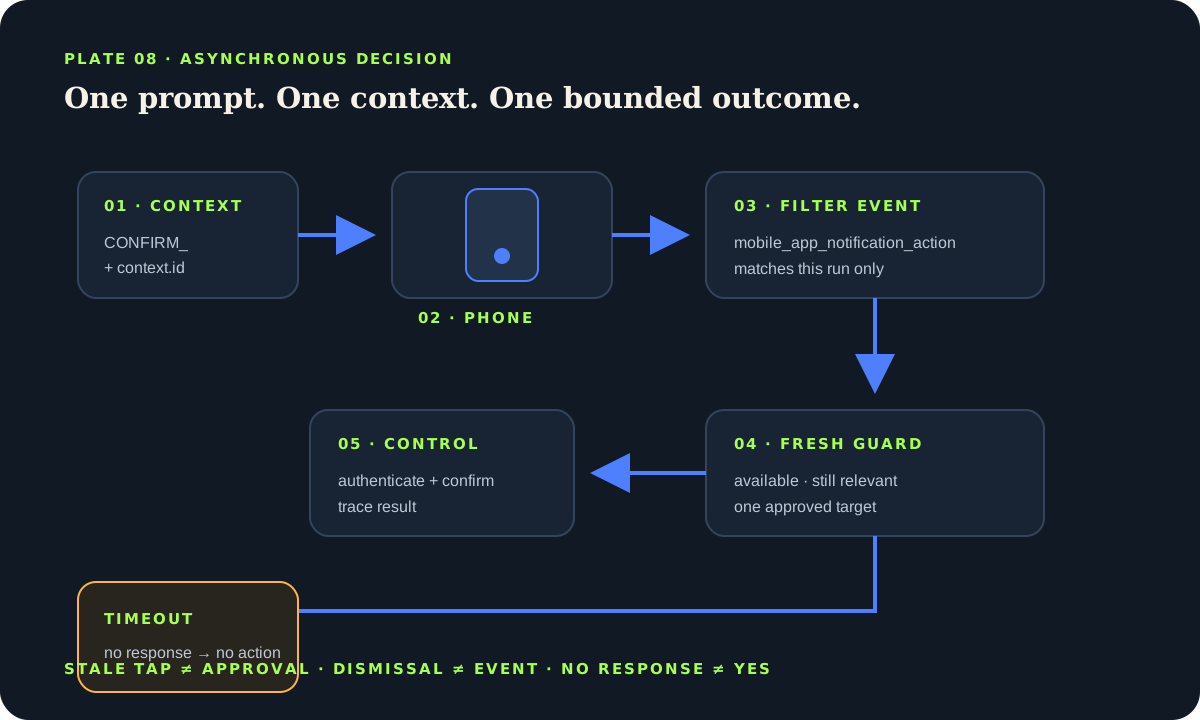
Bench answer
The reliable starting point
Create action identifiers that are unique to each script run by including the Home Assistant context ID. Send no more choices than the phone can present clearly, then wait for the matching mobile_app_notification_action event with a bounded timeout. Treat dismissal, app failure and silence as no approval. For locks, doors, alarms, valves or other consequential actions, require device authentication where supported, add a second in-app confirmation or avoid lock-screen control entirely, and re-check current entity state immediately before acting.
Understand the round trip before adding buttons
An actionable notification is not a remote procedure call that waits reliably on a phone. Home Assistant sends a message through a mobile-app notify action. The operating system decides how to display it. When a person taps a button, the Companion app sends a mobile_app_notification_action event back to the Home Assistant server that issued the notification. Your automation or script must filter that event and decide what, if anything, is still allowed.
Delivery can be delayed, hidden by focus settings or lost when the device is offline. The app can be closed, and dismissal does not always produce an event. A user may tap after the underlying situation changed. Design the prompt as an asynchronous request whose answer may never arrive, rather than as a guaranteed dialog box.
Make action IDs unique to one run
Action names are shared across notifications. A static value such as OPEN can let a reply to an older prompt match a newer script that happens to be waiting for the same text. The official Companion documentation recommends creating unique actions for every run. Concatenate a readable prefix with context.id, then use the resulting variables both in the outgoing buttons and the event filter.
Keep titles human and identifiers machine-specific. “Keep closed” and “Review camera” communicate better than internal entity names. Do not place secrets, access codes or personal data inside the action identifier because events and traces may retain it. If multiple people receive a prompt, decide whether the first accepted answer ends the run and what a later tap should do.
sequence:
  - variables:
      action_confirm: "{{ 'CONFIRM_' ~ context.id }}"
  - action: notify.mobile_app_house_admin
    data:
      title: "Garage is still open"
      message: "Review the current state before taking action."
      data:
        actions:
          - action: "URI"
            title: "Review"
            uri: "/dashboard-home/garage"
          - action: "{{ action_confirm }}"
            title: "Request close"
authenticationRequired: trueWait narrowly, expire deliberately
Use wait_for_trigger for the mobile-app action event and filter against the unique identifiers. A navigation-only button uses the cross-platform URI action and does not enter this authorization wait. Set a timeout appropriate to the decision and choose continue_on_timeout: true when the script needs a visible timeout branch. The wait.completed variable distinguishes a match from expiry. If the app crashes or closes, the expected event may never fire; the official documentation explicitly says a timeout should still be considered.
After a match, inspect wait.trigger.event.data.action and branch only for the identifiers created in this context. Do not keep an authorization prompt alive all day. Replace or clear stale notifications using the platform-supported tag or notification command when appropriate, while remembering that removing the visual message does not undo an event already delivered.
- wait_for_trigger:
    - trigger: event
      event_type: mobile_app_notification_action
      event_data:
        action: "{{ action_confirm }}"
  timeout: "00:03:00"
  continue_on_timeout: true
- choose:
    - conditions: "{{ wait.completed and wait.trigger.event.data.action == action_confirm }}"
      sequence:
        - action: script.review_then_close_garage
  default:
    - action: logbook.log
      data:
        name: "Garage prompt"
message: "Expired or review-only; no close command sent."Add friction to consequential actions
A lock-screen button can be touched accidentally, exposed in a screenshot or available to someone holding an unlocked phone. Platform options such as authenticationRequired improve friction where supported, but behavior differs by operating system and version. Test the exact phone. For unlocking, opening, disarming, reopening water or disabling protection, the conservative pattern is to navigate to a focused dashboard, require normal Home Assistant authentication, show current state and ask for a second deliberate confirmation.
Immediately before any action, re-check that the entity is available, the triggering condition is still relevant and the target is exactly one approved device. A message saying “door open” may be stale by the time it is tapped. Do not use a notification as the only safeguard on a lock, garage, alarm or valve. Retain physical interlocks, obstruction detection, manual controls and ordinary observation.
Never present a Home Assistant notification system as certified security, access control, medical alert or life-safety infrastructure. Mobile delivery, networks and automations can fail independently. Use required dedicated systems for those purposes.
Route the right prompt to the right person
Separate informational messages from authorization prompts. A household group may receive “laundry complete,” while only an administrator device should receive a request that can change access or protection state. Device names change when apps are reinstalled; audit notify targets and remove retired phones. If several servers are connected to an app, the Companion documentation notes that actions are fired on the server that sent the notification.
Keep notification text self-contained: name the location, current observation, requested decision and expiry. Avoid vague buttons such as “Yes” when several messages may be stacked. Use “Keep closed,” “Review garage” or “Snooze 15 min.” For text replies, validate the returned text as untrusted input; never concatenate it into templates, shell commands or entity IDs.
Respect quiet hours without suppressing urgent maintenance signals silently. A low-priority reminder can wait; an active water alert needs the independent local response described in the leak guide. The notification channel should match consequence, not novelty.
Test duplicates, stale taps and silence
Run two prompts close together and prove that a button from the first cannot satisfy the second. Tap after the timeout and confirm that no device action follows. Test with the phone locked, unlocked, offline and in its restrictive notification mode. Restart Home Assistant while a script waits and document the result. Verify Android and Apple devices separately because action limits and presentation differ.
Inspect traces and the event listener in Developer tools during commissioning, but do not leave a broad event logger exposing sensitive reply text. Test the default branch as seriously as the accepted branch. A prompt that times out quietly while the device remains in an ordinary safe state is a successful design outcome.
Actionable-notification checklist
- Every run uses context-specific action identifiers.
- The wait has a bounded timeout and no-response branch.
- Consequential actions require authentication and fresh state checks.
- Retired phones and broad notify groups cannot authorize control.
- Duplicate, stale, offline and restart cases were traced.
Source desk
Primary documentation used for this guide. Interface names and behaviors can change; confirm the current page before changing a live installation.
- Actionable notificationsOfficial actions, unique-context pattern, events and timeout caveat.Official source ↗
- Script syntaxOfficial variables, waits, timeouts and branching.Official source ↗
- Automation actionsOfficial action sequencing and script syntax in automations.Official source ↗
- Automation troubleshootingOfficial traces and controlled action testing.Official source ↗
Source review completed .
Frequent questions
Why include context.id in a notification action?
Action identifiers are shared across notifications. Adding the current script context makes each prompt unique, reducing the chance that a response to an old or concurrent notification matches the wrong run.
What happens if the user dismisses the notification?
Do not assume a dismissal event will arrive. The app may be closed or fail, so use a bounded timeout and make no response mean no consequential action.
Can I safely unlock a door from a notification?
The conservative choice is to navigate to an authenticated dashboard, display fresh state and require deliberate confirmation. A lock-screen button should not be the only safeguard for access control.
How many action buttons should I add?
Use the smallest clear set and test on every supported phone. Platform interfaces have different practical limits; too many choices become hard to inspect and easier to tap incorrectly.
Are actionable notifications a certified alarm channel?
No. Phone delivery, the app, network and Home Assistant can all fail. Use dedicated required alarm and life-safety systems, and treat notifications as a convenience or supplementary signal.