Bench answer
The reliable starting point
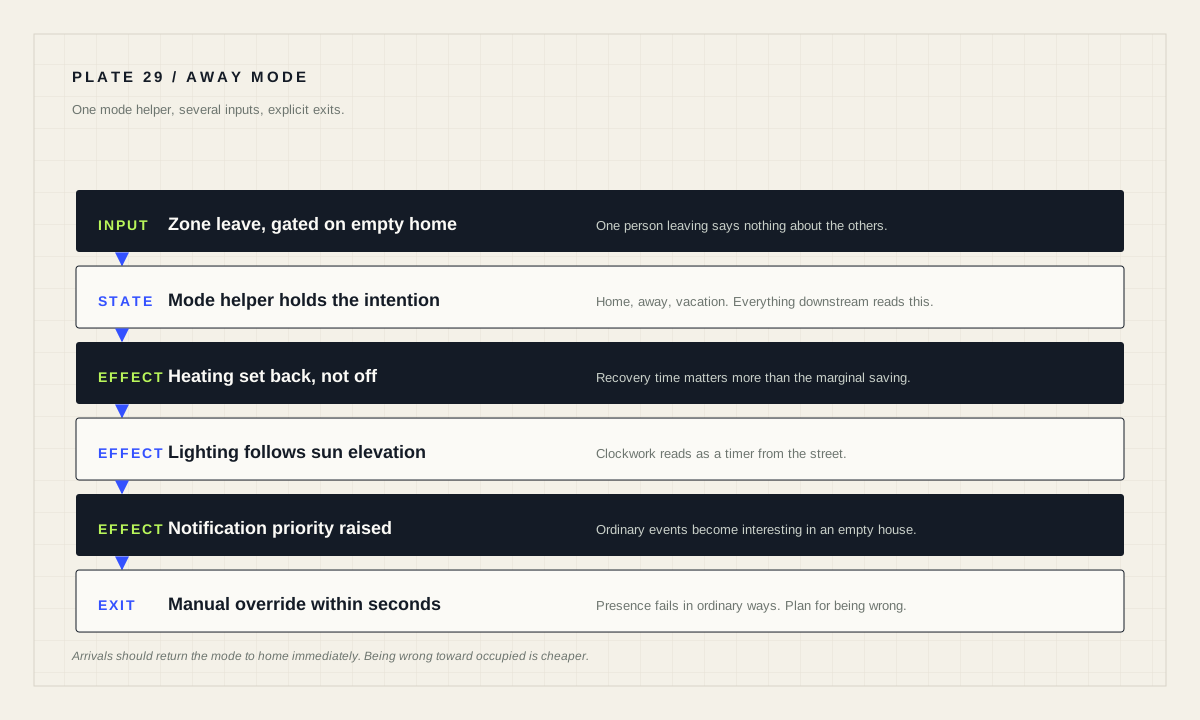
Drive away behaviour from an explicit mode helper rather than directly from presence, so you always have a manual override. Change the mode using zone triggers, which fire when a person or device tracker enters or leaves a zone. Keep vacation lighting believable rather than clockwork, never announce absence publicly, and make sure every away routine can be cancelled from a phone in under ten seconds.
Put a mode helper between presence and behaviour
The instinct is to trigger routines directly from a presence entity. Resist it. Presence detection is probabilistic; away behaviour is consequential. Putting an explicit mode helper in between gives you three things: a single place to read the current intention, a manual override, and a trace that shows the mode changed rather than leaving you to infer it.
Three modes cover most households: home, away, and vacation. Away is a normal working day and can be reversed automatically. Vacation is deliberate, entered by a person, and should never be exited automatically by a phone that briefly appeared on the network.
Everything downstream reads the mode. Heating setbacks, lighting simulation, notification urgency and camera behaviour all become conditions on one value instead of duplicated presence logic in a dozen automations.
Change the mode with zone triggers
The zone trigger fires when an entity is entering or leaving a zone, and the entity can be either a person or a device tracker. That is the correct mechanism for a mode change, because it describes a transition rather than a state you have to poll.
alias: "Mode — set away when the last person leaves home"
triggers:
  - trigger: zone
    entity_id: person.denis
    zone: zone.home
    event: leave
conditions:
  - condition: state
    entity_id: input_select.house_mode
    state: "home"
  - condition: numeric_state
    entity_id: zone.home
    below: 1
actions:
  - action: input_select.select_option
    target:
      entity_id: input_select.house_mode
    data:
      option: "away"
mode: single
Note the second condition. A zone-leave trigger for one person says nothing about the others, so the routine checks that the home zone is actually empty before switching modes. Without that check, one person walking to the shop puts the whole house into away mode while a family sits in the living room.
The reverse direction should be more eager and less clever: any person entering the home zone returns the mode to home immediately. Being wrong in the direction of “the house behaves as if occupied” is nearly always the cheaper error.
Design for presence being wrong
Presence fails in ordinary ways. A phone stays behind. A battery dies. Someone's device connects to a neighbour's network. A VPN-based remote-access setup that is not permanently connected means, as the documentation notes for companion-app sensors, that sensors will not update — and a device tracker that has stopped updating looks exactly like a device tracker reporting absence.
Two design rules follow. First, make away mode reversible by a human in seconds: a dashboard button, a notification action, or a spoken command that anyone in the household can use. Second, degrade gently — away mode should reduce heating and change lighting, not lock people out or make the house hostile to someone who is actually inside.
Where a presence gap would be genuinely expensive, add a second signal. A motion sensor that fires while the house believes it is empty is strong evidence the belief is wrong, and it should return the mode to home rather than escalate.
Vacation lighting that does not look automated
Clockwork is the giveaway. A lamp that switches on at 19:00 every evening and off at 23:00 every night reads as a timer from the street. Believable occupancy has three properties: it follows the season, it varies, and it happens in more than one room.
Follow the season by driving evening lighting from sun elevation rather than a clock. The trigger documentation recommends elevation triggers over sunset with an offset precisely because twilight duration changes through the year, and a value between 0° and −6° suits dusk. That single change makes simulated occupancy track real households automatically.
Vary the timing with small offsets rather than exact repeats, and move activity between rooms across the evening — kitchen early, living room mid-evening, a landing or bedroom light last. Keep it modest: the goal is an unremarkable house, not a performance.
What else should change when nobody is home
Heating and cooling. A setback rather than a shutdown. Coming home to a cold house is a worse outcome than a modest saving, and some systems are slow to recover.
Notification thresholds. Events that are unremarkable when occupied become interesting when empty: a door opening, water detected, a camera reporting motion. Raise the priority rather than inventing new sensors.
Routines that assume people. Motion-triggered lighting, media announcements and voice routines should be suppressed or reduced. A house talking to itself is a waste at best and confusing at worst.
Nothing that needs a person to recover. Avoid anything in away mode whose failure requires someone on site — unattended appliance runs, valve operations without verification, or a heating change that cannot be undone remotely.
Coming home, and the calendar case
The return path deserves as much thought as the departure. Vacation mode should end deliberately, and the arrival routine should be conservative: restore heating, restore normal notifications, and stop lighting simulation. Do not stage a welcome that depends on precise timing you cannot verify.
For planned absences, the calendar trigger is a good fit. It fires when a calendar event starts or ends, with an optional offset, and the documentation notes this is far more flexible than using the calendar entity state, which supports only a single event start at a time. A “holiday” calendar entry can therefore raise vacation mode the evening before and clear it on return, with the change still visible and overridable.
Finally, review the whole thing once before a real trip. Set the mode manually, walk the house, and check that heating, lighting, notifications and any camera behaviour are what you actually want. Away mode is the routine least likely to be tested and most likely to matter.
Before you leave
- Mode helper exists and every routine reads it.
- Away triggered by zone leave, gated on the home zone being empty.
- Any arrival returns the mode to home immediately.
- Manual override reachable from a phone in seconds.
- Evening lighting driven by sun elevation, varied, and multi-room.
- Nothing publicly announces the absence.
- Heating set back, not switched off.
- Whole routine rehearsed once while still at home.
Source desk
Primary documentation used for this guide. Interface names and behaviors can change; confirm the current page before changing a live installation.
- Automation triggersOfficial zone, calendar and sun elevation trigger behaviour.Official source ↗
- Remote accessOfficial note that companion-app sensors do not update without a VPN connection.Official source ↗
- Automation conditionsOfficial conditions used to gate mode changes.Official source ↗
Source review completed .
Frequent questions
What triggers a change into away mode?
A zone trigger, which fires when an entity is entering or leaving a zone. The entity can be either a person or a device tracker.
Why use a mode helper instead of triggering directly from presence?
Because presence detection is probabilistic and away behaviour is consequential. A helper gives you one readable intention, a manual override, and a clear trace of when the mode changed.
Why does my house go into away mode when someone is still home?
A zone-leave trigger for one person says nothing about the others. Add a condition confirming the home zone is empty before changing the mode.
How do I make vacation lighting look believable?
Drive evening lighting from sun elevation rather than a clock so it follows the season, vary the timing, and move activity between rooms instead of repeating one fixed pattern.
Can a calendar entry control vacation mode?
Yes. The calendar trigger fires when an event starts or ends and accepts an optional offset, which is more flexible than the calendar entity state that supports only a single event start at a time.