Bench answer
The reliable starting point
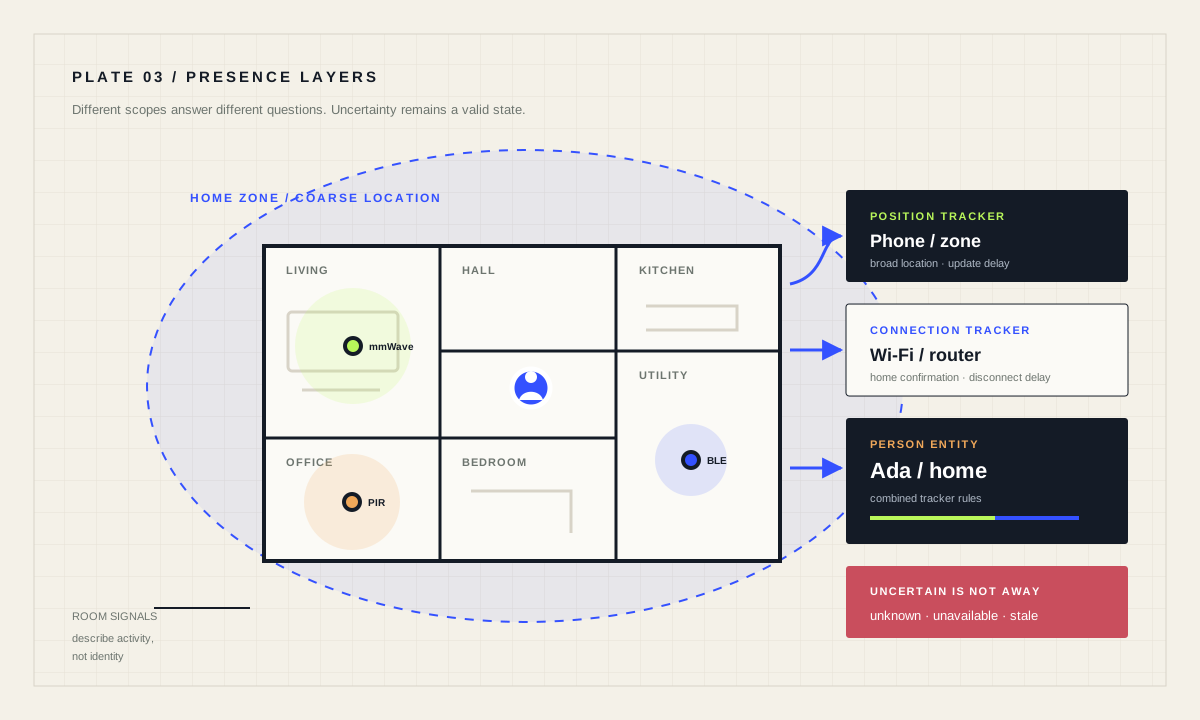
Use a person entity to combine device trackers for home and zone automations, and separate room-level occupancy sensors for local behavior. Require a stable away period before broad shutdowns, treat unknown and unavailable as uncertainty, and never use one phone or GPS point as proof that a property is secure or empty.
Separate property, person and room presence
Property presence answers whether anyone is probably home. Person presence links that state to an individual and may include zones such as work or school. Room occupancy asks whether a local space is in use. These are different questions: a phone connected to Wi-Fi does not identify the occupied room, and a living-room PIR pulse does not identify a person.
Start with the decision you need. Arrival lighting may use a person entering the home zone plus darkness. Whole-home “away” behavior should aggregate every relevant person and wait through tracker delays. Room comfort should use local occupancy and retain manual control. The larger the consequence, the more independent evidence and recovery paths it deserves.
Understand device_tracker, person and zone
A device_tracker is supplied by another integration, such as a companion app or router. It may report exact position or connection to a fixed device. A person entity can combine multiple trackers. Official behavior gives connection trackers priority while home, then position trackers; away from home, position trackers take priority. This reduces common transition errors but does not make the result instantaneous.
Zones are geographic regions used by people and trackers. The zone state is the number of people currently inside, while zone triggers can react to entry, exit or occupancy changes. Use a zone radius that reflects GPS accuracy and the actual approach path. Very small zones can flap; very large zones can trigger before arrival.
Compare signals by delay, scope and privacy
Scroll horizontally to compare every column.
| Signal | Best question | Typical weakness | Privacy |
|---|---|---|---|
| Phone position | Which zone is this person in? | Update delay and GPS error | Exact location can be sensitive |
| Router / Wi-Fi | Is this device connected at home? | Sleep and disconnect delay | Local connection history |
| Bluetooth beacon | Is a carried device near a receiver? | Range, reflection and battery | Local proximity history |
| PIR motion | Was movement detected here? | Misses still occupants | Low identity detail |
| mmWave occupancy | Is fine motion present? | Spill into adjacent spaces | Detailed room usage |
No row is universally superior. Combine only what improves the decision, document retention, and avoid collecting precision you do not need.
Build an away decision that can admit uncertainty
A cautious away automation triggers only after the home zone has been unoccupied for a stable interval. It checks that every relevant person is not home and that their states are neither unknown nor unavailable. It then performs reversible convenience actions—turning off selected lights or reducing media—not security-critical claims. A notification can report what changed.
Restart caveat: the ten-minute for timer does not survive a Home Assistant restart or automation reload. In this reversible example, a reset delays the shutdown until a complete new interval has passed. If the deadline itself must persist, use the documented input_datetime timestamp pattern instead of relying on an in-memory for timer.
Do not automatically unlock a door because a single tracker enters a zone. GPS can jump, credentials can be compromised and a phone can arrive without its owner. Use secure access-control hardware and explicit authenticated action for entry. Likewise, occupancy data can support alarm awareness but cannot replace certified detection or monitoring.
alias: "Home empty — reversible shutdown"
triggers:
  - trigger: numeric_state
    entity_id: zone.home
    below: 1
    for: "00:10:00"
conditions:
  - condition: template
    value_template: >-
      {{ states('person.ada') not in ['home', 'unknown', 'unavailable']
         and states('person.sam') not in ['home', 'unknown', 'unavailable'] }}
actions:
  - action: light.turn_off
    target:
      area_id: living_room
  - action: notify.send_message
    target:
      entity_id: notify.household
    data:
      message: "Home appeared empty for 10 minutes; living-room lights were turned off."
mode: singleCollect less location data, expose less system
Exact coordinates, named zones and room occupancy reveal routines. Give login access only to people who need it, use strong unique passwords and multi-factor authentication, keep Home Assistant current, and use a secure remote-access method instead of exposing an unprotected instance directly. The official security guidance notes that secrets.yaml centralizes values but does not encrypt them.
Disable trackers you do not use and prefer a coarse home/not-home signal when exact position adds no value. Avoid screenshots or exported traces that reveal coordinates. Review any third-party integration’s data path and account permissions. Presence automations should be explainable to every person whose data they use.
Validate transitions over ordinary days
Record arrival and departure times from entity history for several normal journeys. Look for delayed Wi-Fi disconnects, GPS jumps, phone power-saving gaps and states after a Home Assistant restart. Test two people leaving at different times and one person returning quickly. For room sensors, test stillness, open doors, pets and adjacent movement.
Set the stable period from observed worst cases plus a reasonable margin, not from a forum default. If you create a template occupancy entity, expose an “uncertain” diagnostic alongside it instead of hiding missing inputs. Review the logic after changing phones, routers, sensor placement or integrations.
Presence acceptance checklist
- Every signal’s scope and delay are documented.
- Unknown and unavailable never mean “definitely away.”
- Whole-home changes wait through a stable interval.
- Security and access control do not rely on one tracker.
- Location precision and account access are minimized.
Source desk
Primary documentation used for this guide. Interface names and behaviors can change; confirm the current page before changing a live installation.
- Device trackerOfficial tracker states, zones and tracker types.Official source ↗
- PersonOfficial multi-tracker precedence and person setup.Official source ↗
- ZoneOfficial zone state, triggers, conditions and examples.Official source ↗
- Automation triggersOfficial persistence limits for for-timers and the input_datetime alternative.Official source ↗
- Securing your Home AssistantOfficial account and remote-access checklist.Official source ↗
Source review completed .
Frequent questions
Should I attach more than one tracker to a person?
It can improve transitions when the trackers provide complementary connection and position signals. Understand Home Assistant’s precedence rules and test how each tracker updates before relying on the combined state.
Can Wi-Fi prove someone is home?
It proves that a device appears connected to the associated network, not that its owner is present. Phones can remain behind, sleep or disconnect late, so use it as one signal.
What zone radius should I use?
Use a radius large enough for the tracker’s observed GPS accuracy and approach path without triggering implausibly early. Test multiple arrivals; there is no universal value.
Is mmWave always better than PIR?
No. It can detect finer movement but may see into neighboring areas and needs tuning. PIR is often sufficient for transit spaces. Room shape and desired behavior decide.
Can presence detection safely unlock my door?
A zone or tracker alone is not strong authentication. Use purpose-built secure access control and an explicit authenticated method; do not equate a phone location with authorization.