Bench answer
The reliable starting point
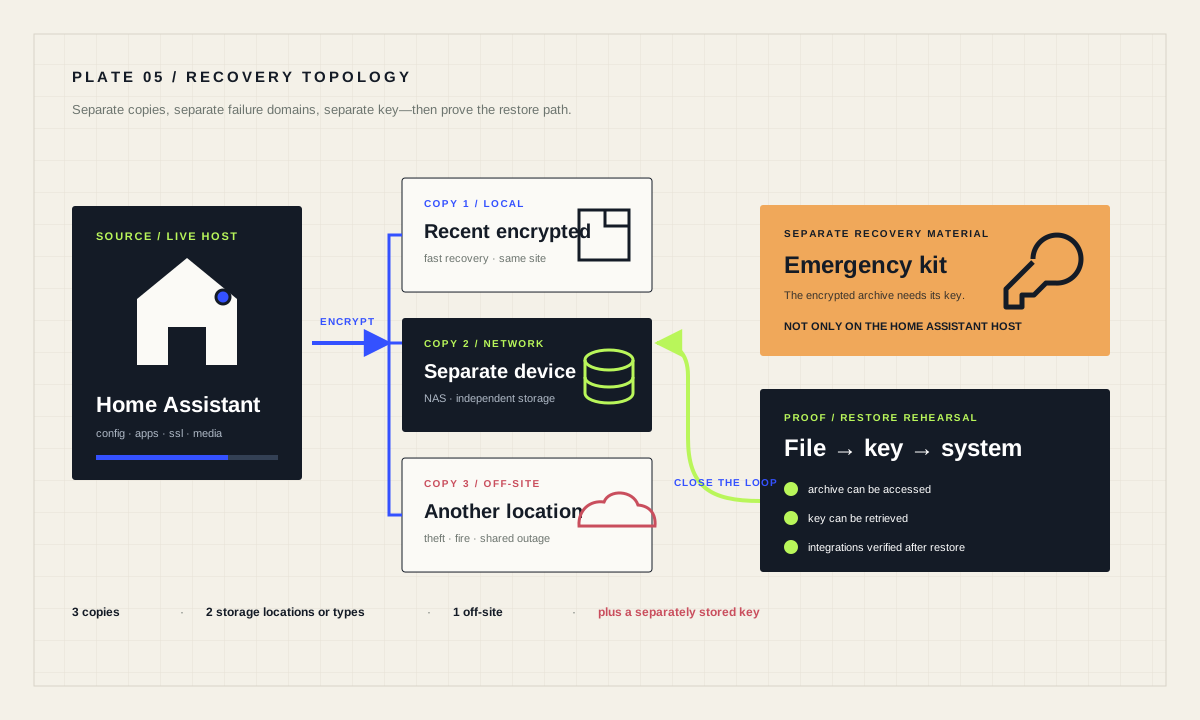
Configure automatic backups under Settings → System → Backups, keep recent copies outside the Home Assistant host and ideally off-site, then store the backup emergency kit separately. Create a manual backup before high-impact changes. Periodically verify that a backup can be listed, downloaded and restored in a safe rehearsal; an untested file is only a hope.
Know what full and partial backups contain
A full Home Assistant backup can include configuration, share, manually installed or created apps, SSL material and media. A partial backup includes selected parts. Large media and shared folders can dominate size and restore time, so decide whether they belong in Home Assistant protection or in a separate storage plan.
Inventory integrations that depend on hardware radios, credentials, external databases or files outside the backed-up directories. A Home Assistant archive cannot copy a device that failed or guarantee that an external service still exists. Record radio models, network details and any separate vendor recovery steps alongside the backup plan.
Set a schedule and retention you can explain
Use the built-in automatic backup configuration to select frequency, time, pre-update behavior, retention and locations. Daily is a practical starting point for an actively changing system, but the right frequency follows from how much work you can afford to lose. Choose a time when network targets are normally reachable.
Retention is not protection by itself. Keeping seven daily files on the same failing storage device leaves one failure domain. Preserve enough history to recover from a problem discovered late, while monitoring capacity and backup failures. Check the backup page after changing network storage credentials or host names.
Protect the emergency kit as carefully as the archive
Home Assistant Cloud backups are always encrypted. For other backup locations, encryption can be enabled or disabled in the location settings; verify the setting instead of assuming every archive is encrypted. Restoring an encrypted backup requires the encryption key from its emergency kit. Download the kit when prompted and store it in a password manager, secure document vault or other location that remains available if the Home Assistant device and home network are lost. Do not keep the only copy on the host being protected.
When you download a backup from the Home Assistant backup page, Home Assistant decrypts it on the fly. Treat that downloaded archive as sensitive because it can contain configuration, credentials and household history. Limit access, use encrypted transport and storage, and delete obsolete copies deliberately.
Put copies in different failure domains
A practical 3-2-1 pattern keeps three copies, on two kinds or locations of storage, with one off-site. Home Assistant can target local, network and supported cloud backup locations. The exact products matter less than independent failure: a NAS in the same cabinet may protect against a dead drive but not theft, fire or a shared power event.
Verify that the remote target receives new backups and that retention behaves as intended. An automation that powers a NAS before backup can be useful, but it adds dependencies; confirm the NAS is online before the action and surface failures visibly. Do not rely on a green automation run if the destination silently rejected the file.
alias: "Weekly backup reminder"
triggers:
  - trigger: time
    at: "19:00:00"
conditions:
  - condition: time
    weekday: [sun]
actions:
  - action: notify.send_message
    target:
      entity_id: notify.household_admin
    data:
      message: "Check that this week's automatic backup exists in an off-device location."
mode: singleRehearse restore without improvising during failure
At minimum, confirm that you can list the archive, access the emergency kit and download a copy from another device. A stronger rehearsal uses spare or temporary compatible hardware and the onboarding restore flow. Record how long your own system takes; official documentation warns that larger restores can take time, but no fixed duration applies to every installation.
A restore overwrites the selected current parts and restarts Home Assistant. Before rehearsing on a live system, create a fresh backup and understand the selection. When migrating, reconnect required radio controllers or sticks and verify integrations, entity availability, automations and dashboards after startup. Do not declare success because the login screen appears.
Make backup health part of ordinary operations
Create a manual backup before major updates, new integrations, radio migrations and broad YAML edits. Keep Home Assistant and its host current, use strong accounts and multi-factor authentication, and avoid exposing the instance directly to the internet. A backup helps recovery; it does not reduce the need to prevent compromise.
Quarterly, review destinations, retention, encryption key access, restore notes and external dependencies. Update the runbook after hardware or network changes. Make failure visible with a dashboard note or reminder rather than assuming silence means success.
Recovery readiness checklist
- Automatic backups complete on the intended schedule.
- At least one current copy is outside the Home Assistant host.
- The emergency kit is stored separately and retrievable.
- A restore path has been rehearsed and documented.
- External radios, services and files have their own plan.
Source desk
Primary documentation used for this guide. Interface names and behaviors can change; confirm the current page before changing a live installation.
- Common tasks: backups and restoreOfficial automatic, manual, location and restore workflow.Official source ↗
- Backup emergency kit and encryptionOfficial encryption behavior by destination, emergency-kit requirements and download handling.Official source ↗
- 3…2…1… BackupOfficial Home Assistant overview of resilient backup practice.Official source ↗
- Securing your Home AssistantOfficial account, updates and remote-access guidance.Official source ↗
Source review completed .
Frequent questions
Are Home Assistant backups encrypted?
Home Assistant Cloud backups are always encrypted. Encryption for other backup locations is configurable, so verify each destination. Keep the matching emergency kit safe for every encrypted backup because its key is required for restore.
Is a backup on the Home Assistant device enough?
No. It can help with configuration mistakes, but it shares the device’s failure, theft and damage risks. Keep a current off-device copy and ideally an off-site copy.
How often should I back up?
Choose from how much recent work you can afford to lose. Daily is a practical starting point for an active system, with an additional manual backup before high-impact changes.
Does restore take a fixed amount of time?
No. Size, hardware, apps and storage affect duration. Measure a rehearsal on your setup and allow for a restart and post-restore verification.
Can a backup migrate Home Assistant to different hardware?
The onboarding restore flow supports migration, including to different target hardware in documented cases. Reconnect required radios and verify every integration afterward.