Bench answer
The reliable starting point
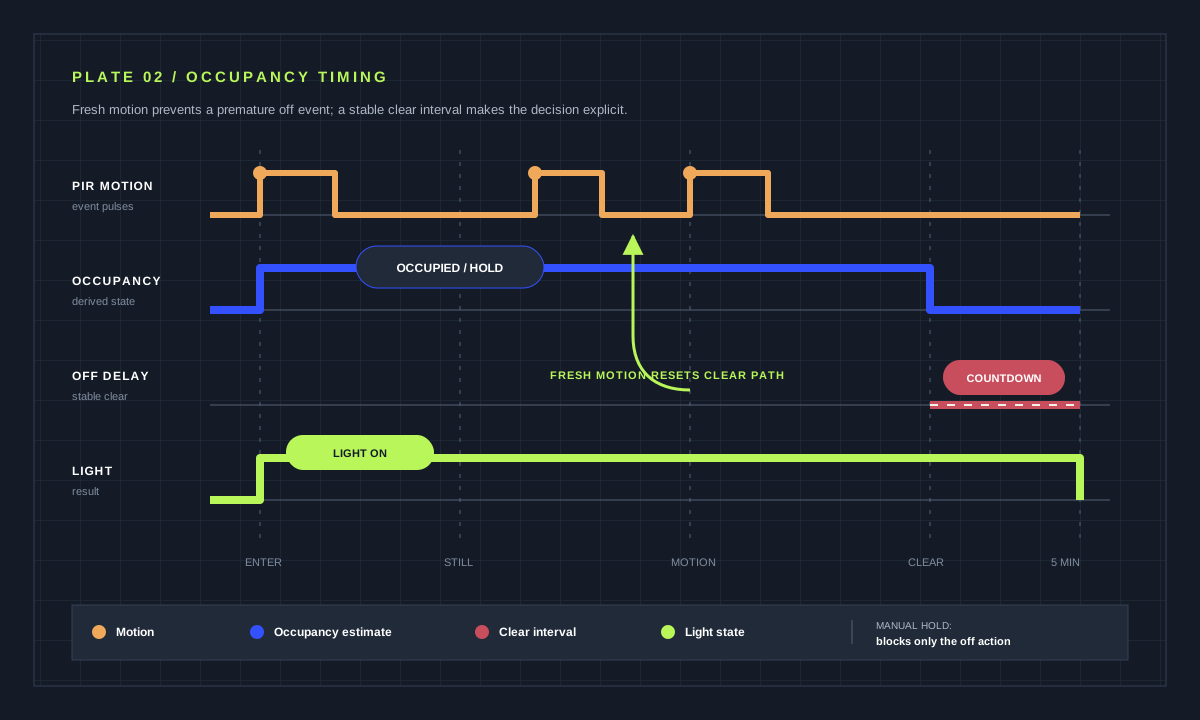
Use motion or occupancy becoming active to turn the light on, and a stable inactive period to turn it off. Gate switch-on with a light-level or sun condition, not the off path. For a delay-based routine, restart mode lets fresh motion restart the countdown. Keep a wall control, provide a manual-override helper, and test unavailable sensors before trusting the routine.
Choose a sensor for the behavior, not the label
A passive infrared sensor usually detects movement across its field and may go inactive while someone sits still. An mmWave or combined occupancy device can detect smaller movement, but placement and sensitivity may create detections through thin materials or into an adjacent zone. Door contacts add useful context but do not prove that a room is empty. Review the entity’s actual on/off timing in Home Assistant before writing the rule.
For corridors and utility rooms, PIR plus a short timeout is often enough. A bathroom, office or reading area needs a longer inactive period, a more suitable occupancy sensor, or a second signal. Avoid copying a universal “two-minute” setting. Observe the room, choose a conservative starting value, then tune from traces over several normal days.
Model four states instead of one timer
A robust routine distinguishes occupied-and-dark, occupied-and-bright, inactive-but-waiting and inactive-long-enough. On detection, the automation checks brightness and turns the light on if needed. When detection clears, it begins an off-delay. If detection returns, the countdown is cancelled or restarted. After a stable inactive interval, the light may turn off unless a manual override is active.
Put the brightness condition only on the switch-on branch. If the room becomes bright after the light is on, that fact should not prevent the off branch from running. A numeric lux threshold needs hysteresis or a sensible margin so small fluctuations do not chatter around a boundary. The sun’s state is simpler but cannot account for dark interiors or weather.
Use trigger IDs to keep the paths readable
Two triggers can feed one automation: occupancy on and occupancy off for a stable period. Trigger IDs make the action choice legible in both the editor and trace. In this pattern there is no explicit delay action, because the off trigger itself requires a five-minute inactive state. That avoids a long-running sequence and works well with the default mode. If you instead use an action delay, restart is normally the intended repeat-trigger behavior.
Restart caveat: a trigger’s for timer does not survive a Home Assistant restart or automation reload. Here, a reset conservatively delays switch-off until the sensor has been continuously clear for a new five-minute interval. If a deadline must persist, store the target time in an input_datetime helper and trigger from that timestamp as the official trigger documentation recommends.
alias: "Hall — light from occupancy"
triggers:
  - trigger: state
    entity_id: binary_sensor.hall_occupancy
    to: "on"
    id: occupied
  - trigger: state
    entity_id: binary_sensor.hall_occupancy
    to: "off"
    for: "00:05:00"
    id: clear
actions:
  - choose:
      - conditions: "{{ trigger.id == 'occupied' }}"
        sequence:
          - condition: numeric_state
            entity_id: sensor.hall_illuminance
            below: 35
          - action: light.turn_on
            target: {entity_id: light.hall}
      - conditions: "{{ trigger.id == 'clear' }}"
        sequence:
          - condition: state
            entity_id: input_boolean.hall_manual_hold
            state: "off"
          - action: light.turn_off
            target: {entity_id: light.hall}
mode: singleMake manual override visible and finite
An input_boolean helper can represent “hold this light.” Put it on the room dashboard and use a name the household understands. The off branch checks the helper before acting. Decide how the hold ends: a visible manual reset, a time-based reset after everyone is likely asleep, or a separate “resume automatic lighting” action. An override that silently stays on forever becomes a hidden fault.
Do not infer manual intent only from the light being switched on. The automation may have turned it on itself, and state context can be lost after restarts. A dedicated helper is explicit and traceable. If a smart wall controller supports events while maintaining power to the lamp, document how it behaves during a Home Assistant outage.
Test stillness, daylight and recovery
Walk into the room in darkness, remain still for longer than the sensor’s clear time, move again near the end of the off-delay, then repeat in daylight. Test the manual hold and release. Temporarily make the occupancy and lux entities unavailable if you can do so safely, or observe a real integration restart. The safest default is normally to avoid switching a load based on uncertain input.
Use traces to distinguish sensor timing from automation timing. If the trace never starts, inspect the entity history and trigger. If it starts but stops, inspect the condition. If the action succeeds while the lamp does not respond, the device or integration path needs attention. Fix the failing layer instead of adding more delays.
Room acceptance checklist
- No switch-off while a typical person remains in the room.
- Fresh detection cancels or prevents the off event.
- Daylight blocks switch-on but never traps switch-off.
- Manual hold is obvious and has a reset path.
- Unknown and unavailable inputs cause no surprising action.
Know where convenience automation stops
Motion lighting is not occupancy certification, intrusion detection or emergency lighting. A sensor can miss a still person, lose power, lose radio communication or report stale state. Preserve manual switching and follow local electrical rules. Smart relays connected to mains voltage should be listed for the load and installed by a qualified person where required; this guide intentionally contains no wiring instructions.
For stairs and other fall-risk areas, favor conservative timeouts and independent physical control. For bedrooms, consider whether automatic light is welcome at night at all. The best routine is the one that respects the room’s use, not the one with the most conditions.
Source desk
Primary documentation used for this guide. Interface names and behaviors can change; confirm the current page before changing a live installation.
- Automation triggersOfficial state triggers, durations and trigger IDs.Official source ↗
- Automation conditionsOfficial condition evaluation behavior.Official source ↗
- Automation modesOfficial repeat-trigger semantics.Official source ↗
- Testing and troubleshooting automationsOfficial trace and testing workflow.Official source ↗
Source review completed .
Frequent questions
Should I use PIR motion or mmWave occupancy?
PIR is simple and effective for movement through a space. mmWave can notice smaller motion but needs careful placement and sensitivity tuning. Choose from observed room behavior, not technology alone.
Why does my light switch off while I am still in the room?
The sensor likely clears during stillness or the off timeout is too short. Inspect entity history first, then improve sensor placement, add a second signal or extend the stable inactive period.
Should the automation use restart mode?
Use restart when the action contains a delay that fresh motion should restart. If the off trigger itself requires a stable off period, single mode can be sufficient because the timer belongs to the trigger.
Where should the lux condition go?
Place it in the switch-on path. Putting it at the top level can block the switch-off path and leave lights on when the room becomes bright.
Can motion lighting replace a wall switch?
No. Keep a clear manual path, especially in stairs, bathrooms and other areas where unexpected darkness creates risk. Required emergency lighting needs certified independent controls.