Bench answer
The reliable starting point
Inventory only the devices that matter, preserve their native battery and availability semantics, and create explicit maintenance groups. Use low battery, unavailable and stale reporting as separate reasons for review; do not convert unknown into zero or assume a quiet battery device is offline. Notify on a bounded, persistent exception, prioritize devices by consequence, follow the manufacturer's battery procedure and verify several real state changes after service.
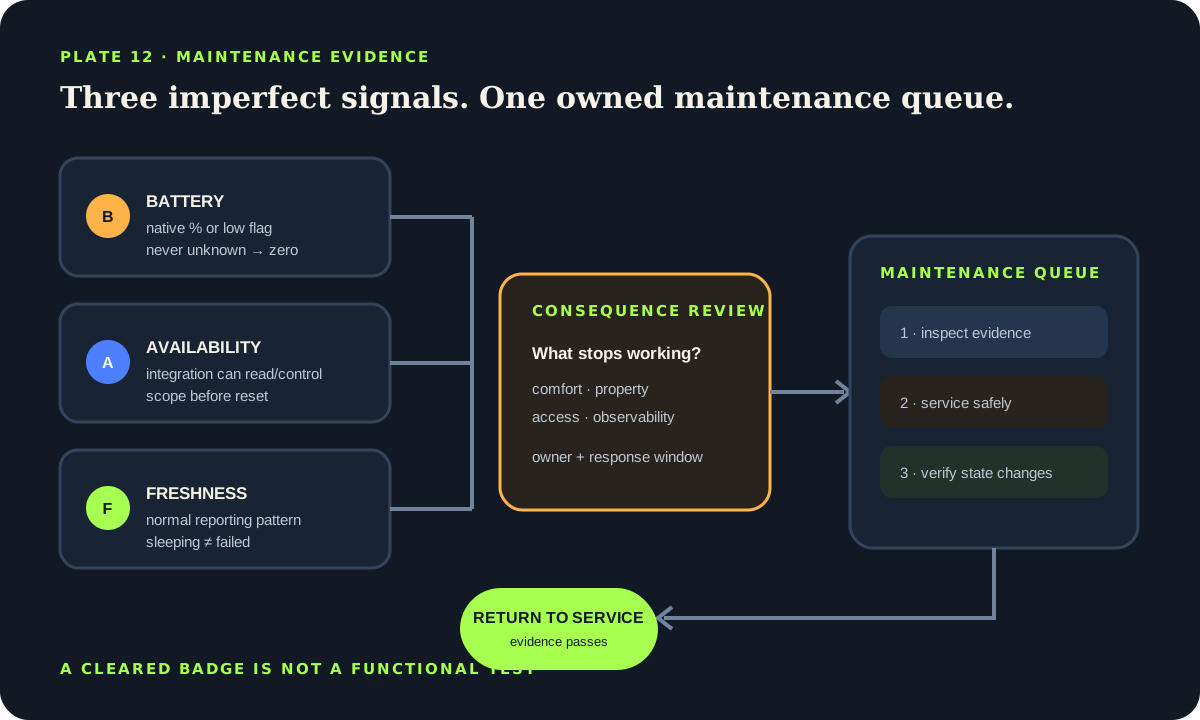
Separate battery, availability and freshness
Home Assistant's battery sensor device class represents remaining percentage when an integration exposes a numeric value, while the battery binary-sensor class uses on for low and off for normal. Those are different contracts. Preserve the integration's native meaning instead of forcing every device into one guessed percentage. Some products report voltage, a coarse level, a low-battery bit or no battery entity at all.
Availability answers whether Home Assistant can currently read or control the entity. unknown means the value is not known; unavailable means the entity cannot currently be reached. Neither means zero, dry, closed or safe. Freshness is a third question: when did the device last provide a meaningful report? A sleeping sensor may be healthy while remaining unchanged for hours, so freshness must reflect its normal reporting and wake behavior.
Create separate maintenance reasons such as low battery, unavailable core device and overdue functional test. A device can satisfy more than one. The queue should show the reason and evidence rather than collapse everything into a red “offline” badge.
Build a consequence-aware device inventory
Start with devices whose failure changes comfort, property risk, access or the observability of another automation. Record device, area, integration, power source, expected reporting pattern, native battery entity, availability entity or proxy, owner, battery type, last service and a safe functional test. Do not publish setup codes, network keys or sensitive access details in a dashboard.
Assign a consequence class. A decorative temperature sensor can wait for the normal maintenance round. A leak sensor, freezer monitor or access contact deserves a shorter review path, but Home Assistant monitoring still does not turn it into a certified life-safety system. Smoke, carbon-monoxide and required alarm systems must retain their listed alarms, supervision and manufacturer maintenance independently of Home Assistant.
Prefer explicit groups or labels over a template that automatically treats every entity with “battery” in its name as equivalent. Naming varies, phone batteries change frequently, UPS capacity is not a coin cell, and entities can be disabled or duplicated. Review new devices before adding them to the monitored set.
Inventory fields
- Device and physical area.
- Native low-battery or percentage entity.
- Availability and normal reporting pattern.
- Consequence class and maintenance owner.
- Battery type, last service and functional-test method.
Use thresholds as review triggers, not battery science
A percentage reported by a device is an estimate shaped by chemistry, load, temperature, firmware and reporting interval. The same displayed value can mean different remaining service across products. Use the manufacturer's low-battery guidance and observed device history. A generic percentage threshold can open a maintenance task; it should not be presented as a precise prediction of runtime.
Apply a duration to reduce notifications from one bad sample, but understand the runtime boundary. A state-trigger for timer does not survive a Home Assistant restart or automation reload. For a reminder that must survive restarts, store a deadline or maintenance state in a helper, or evaluate the current exception on a scheduled trigger. Keep the rule idempotent so repeated evaluation updates one task rather than sending an uncontrolled stream.
Do not combine a low percentage with an unavailable source by converting text to a number. Test has_value or explicit states before numeric comparison. In a template sensor, use an availability template when a valid numeric source is required. Home Assistant documents rate limits for templates that iterate across all states; an explicit set avoids unnecessary broad re-rendering and makes ownership clearer.
template:
  - binary_sensor:
      - name: "Utility leak sensor battery review"
        device_class: problem
        availability: >
          {{ is_number(states('sensor.utility_leak_battery')) }}
        state: >
          {{ states('sensor.utility_leak_battery') | float < 20 }}
The example deliberately treats unavailable as unavailable, not as a low-battery percentage. Replace the entity and threshold with reviewed values for the actual device.
Route an availability exception by integration and consequence
An unavailable entity can reflect a sleeping device, lost radio route, dead battery, unplugged bridge, integration reload, network outage or renamed entity. Begin with scope: one entity, one device, one integration, one radio network or the whole host. Check entity history, integration diagnostics, related entities and known maintenance before replacing hardware.
Set a grace period longer than the normal transient behavior but shorter than the consequence permits. A core coordinator becoming unavailable is different from a rarely reporting button battery. Avoid rapid polling as a universal cure; it can increase network traffic and battery use, especially on low-bandwidth meshes. Follow the integration's diagnostics and device wake instructions.
Use Home Assistant Repairs for issues the platform has identified, and keep your household maintenance queue for device-specific operational exceptions. Do not scrape or duplicate the Repairs interface as if it contains every failure. Some integrations cannot know that a physical sensor is stuck in a plausible old state.
Turn alerts into one owned maintenance flow
Send a digest for ordinary battery work and reserve immediate notification for consequence-reviewed exceptions. Every item should name the device, area, reason, observed state, first-seen time and next action. Acknowledge and snooze are operational states, not proof of repair. Avoid actionable notifications that let an accidental tap suppress a high-consequence issue permanently.
Group physical work into planned rounds. Prepare the exact manufacturer-specified battery, tools and safe access. Follow product instructions for opening, polarity, approved chemistry, disposal and post-replacement reset. Coin and button cells present serious ingestion hazards; keep loose cells and opened devices away from children and follow local disposal rules. Do not improvise mains or permanently installed equipment work from a dashboard alert.
Record the actual replacement date, installed battery type, initial reading and who performed the work. If a device repeatedly reports low soon after correct replacement, investigate temperature, radio path, firmware, reporting interval, device fault and battery quality rather than lowering the alert threshold until it disappears.
DEVICE: utility leak sensor
REASON: low battery / unavailable / functional test due
FIRST SEEN: 2026-07-15 09:30
CONSEQUENCE: property monitoring — manual inspection required
ACTION: follow manufacturer battery procedure
VERIFY: three state changes + restart + normal radio report
CLOSED BY / TIME: ______________________________Verify return to service instead of clearing the badge
After maintenance, wait for the device's normal update and inspect the native state. Trigger several safe physical changes: wet and dry a leak probe according to its test instructions, open and close a contact, or press the device's test control where the manufacturer provides one. Confirm Home Assistant records the changes, dependent automations take the expected branch and notifications do not remain latched incorrectly.
Restart Home Assistant during a planned window or otherwise test integration reconnection when appropriate. Verify the maintenance item remains closed only because current evidence passes, not because a helper was manually cleared. For battery devices, record the post-service value but do not demand an instant 100%; some devices quantize or delay reporting.
Review the maintenance view monthly. Remove retired entities, add newly accepted devices, inspect repeated failures and reconcile the physical battery record. Keep backups current before radio or integration changes. A calm dashboard is the outcome of verified equipment, not hidden exceptions.
Return-to-service gate
- Native battery or low-battery state is valid.
- Availability returns through the normal integration path.
- Several real state changes reach Home Assistant.
- Dependent automation and notification behavior is checked.
- Maintenance record and next review are saved.
Source desk
Primary documentation used for this guide. Interface names and behaviors can change; confirm the current page before changing a live installation.
- Sensor entityOfficial battery device class and sensor state semantics.Official source ↗
- Binary sensor entityOfficial low-battery binary-sensor device class.Official source ↗
- Working with statesOfficial unknown, unavailable, has_value and state access guidance.Official source ↗
- Template integrationOfficial availability templates, numeric-state rules and rendering limits.Official source ↗
- RepairsOfficial platform-generated repair issue workflow.Official source ↗
Source review completed .
Frequent questions
Is every battery sensor in Home Assistant a percentage?
No. Integrations may expose a percentage, voltage, coarse level, low-battery binary sensor or no battery entity. Preserve the native semantics and use the manufacturer guidance.
Should an unavailable battery sensor be treated as zero percent?
No. Unknown and unavailable are not numeric measurements. Keep the entity unavailable, investigate the communication path and avoid a fallback that invents zero.
What low-battery threshold should I use?
Use the device manufacturer's guidance and observed history. A generic threshold can start a maintenance review, but it cannot predict remaining runtime consistently across chemistries and devices.
Why did my low-battery for-timer reset?
Home Assistant state-trigger for timers do not survive a restart or automation reload. Use scheduled reevaluation or a persisted deadline/helper when the reminder must survive those events.
How do I know a device is healthy after changing the battery?
Wait for a normal report, produce several safe physical state changes, check dependent automations and notifications, and verify reconnection after an appropriate restart or integration reload.