Bench answer
The reliable starting point
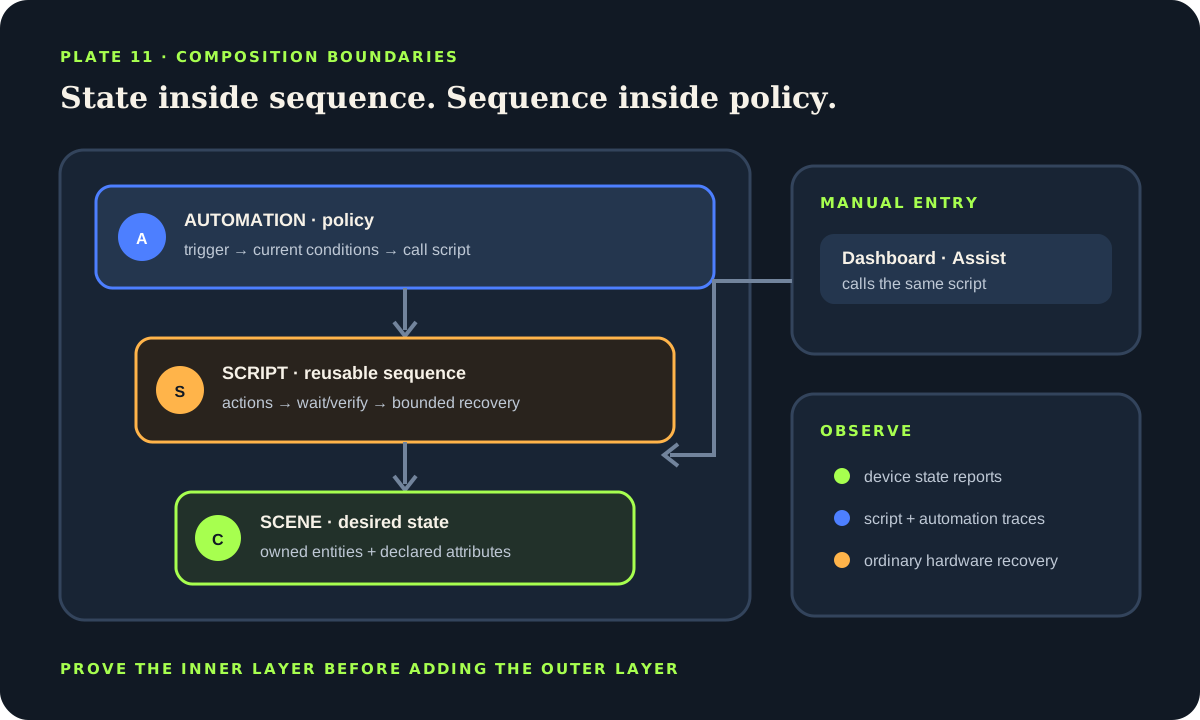
Use a scene when you need several entities to reach declared states, a script when you need an ordered routine that can be called from more than one surface, and an automation when an event or state change should start work automatically. A reliable pattern is automation → script → scene, with conditions at the policy boundary, explicit run modes for overlapping calls and a manual dashboard action that invokes the same script.
Start with the three different jobs
A scene is declarative: it names the state and selected attributes that entities should have. It does not wait, branch or explain why the state should be applied. A script is procedural: it runs actions in sequence when something calls it. It can use variables, conditions, waits, choices and repeats. An automation adds initiation and policy: one or more triggers wake it, current conditions decide whether it may proceed, and actions perform the work.
The distinction matters because the same evening routine may be started by sunset, a wall button, a dashboard or Assist. If every entry point contains a separate copy of the actions, behavior drifts. Put the reusable sequence in one script. Let the sunset automation call it after checking occupancy and let the dashboard call the same script directly. Keep a scene inside the script for the stable lighting state.
Do not force every routine into all three layers. A single light action may be clearer directly inside one automation. Extract a script when a sequence is reused, needs fields, deserves its own run mode or should be callable manually. Create a scene when a named group of target states is meaningful on its own.
Use a scene as a target state, not a hidden workflow
Build the smallest useful scene in Settings → Automations & scenes → Scenes, or define it in YAML. Include only entities the scene truly owns. A movie scene may set two lights and a media input; it should not quietly unlock a door or disable an alarm. Review the exact attributes captured by the editor, because lights and media players can expose many attributes that are not part of the intended experience.
Home Assistant scenes are activated with scene.turn_on; there is no general scene.turn_off action. A scene does not remember a universal previous state. If the household needs a normal-state destination, create a second named scene or write explicit recovery actions. Dynamic scenes can snapshot current state for a temporary workflow, but their lifecycle and restore path must be deliberate.
Test the scene from several starting states. Turn one light off, dim another, make a target unavailable and then activate the scene. Inspect which entities reach the declared state and which fail. A scene call can be part of a robust routine only when the devices involved report state well enough for the outcome to be checked.
Scene acceptance checklist
- The owned entities and target attributes are explicit.
- No safety or access-control state is hidden in a comfort scene.
- A normal or manual recovery path is named.
- The scene is tested from more than one starting state.
- An unavailable entity is visible rather than interpreted as success.
Put reusable action and recovery logic in a script
A script is appropriate when several actions form one household command. Give it a name that describes the outcome, not the initiating device: “Prepare living room for reading” is more reusable than “Wall button double press.” Add an alias to important actions so traces and failures are understandable. Use fields or variables only when callers genuinely need to supply different values.
Choose a run mode from the consequence of a second call. single rejects overlap, restart stops the old run after its current conditions are valid for the new run, queued preserves accepted calls in order up to the configured maximum, and parallel permits independent runs. A routine that controls the same lights and includes delays should not become parallel by accident. Expose any maximum and ignored-call behavior to the operator.
Keep long waits and device assumptions bounded. A wait_for_trigger can use a timeout; follow it with an explicit branch based on whether the expected event arrived. Do not announce success before checking the resulting entity state. When one optional action can fail without invalidating the whole routine, use error continuation narrowly and record the failure through a notification or visible health entity.
alias: "Living room — reading routine"
mode: restart
sequence:
  - alias: "Clear the previous success indicator"
    action: input_boolean.turn_off
    target:
      entity_id: input_boolean.reading_routine_ready
  - alias: "Apply the stable reading state"
    action: scene.turn_on
    target:
      entity_id: scene.living_room_reading
  - alias: "Check that the main light reported on"
    wait_template: "{{ is_state('light.living_room_main', 'on') }}"
    timeout: "00:00:08"
    continue_on_timeout: true
  - choose:
      - conditions: "{{ wait.completed }}"
        sequence:
          - action: input_boolean.turn_on
            target:
              entity_id: input_boolean.reading_routine_ready
    default:
      - action: notify.send_message
        target:
          entity_id: notify.household_admin
        data:
message: "Reading scene ran, but the main light did not report on."Let an automation own the trigger and policy
An automation should explain what wakes the routine and which current facts allow it. Home Assistant describes automations as a trigger plus actions, optionally constrained by conditions. Triggers are events: they start evaluation. Conditions inspect current state after the trigger fires. They are not interchangeable, and a condition can be false by the time an event-driven automation reaches it.
Give multiple triggers IDs when they lead to different policy or messages. Keep presence, quiet hours, illuminance and guest mode in conditions only when they apply to every action in the automation. If a dashboard or voice command must bypass an automatic condition deliberately, call the script directly through a separately labeled manual control rather than simulating the original trigger.
Call the script as the automation action. This keeps the reusable routine trace separate from the automation trace while preserving one implementation. The automation's run mode controls overlapping trigger handling at the outer policy layer; the script's run mode controls calls from every surface. Document both when a second event can arrive during a long routine.
alias: "Reading routine — automatic evening start"
mode: single
triggers:
  - trigger: state
    entity_id: binary_sensor.reading_chair_occupied
    to: "on"
    id: chair
conditions:
  - condition: sun
    after: sunset
  - condition: state
    entity_id: input_boolean.guest_mode
    state: "off"
actions:
  - action: script.living_room_reading_routine
Replace every example entity with an entity verified under Developer Tools → States. Treat the YAML as a composition pattern, not a drop-in configuration.
Give people one manual surface for the same outcome
Add the script to a dashboard button or expose an appropriate low-risk script to Assist. The manual control should describe the outcome and indicate when the routine is running. Avoid a second dashboard action that reimplements the scene and delays. One callable script makes automatic and manual behavior comparable.
An Input button helper can be a visible, stateless trigger for an automation, while a dashboard can also call a script directly. Choose based on whether policy must remain in the automation. A helper is useful when pressing the control itself is the event that should be traced and processed. Direct script invocation is simpler when the user has already made the policy decision.
Manual does not mean unconstrained for high-consequence equipment. Locks, garage doors, alarm states, water valves and safety systems need a separate consequence and authorization review. A dashboard button that activates the same script is not independent recovery if the Home Assistant host, network or integration has failed. Preserve ordinary hardware controls.
Trace each layer and rehearse partial failure
Test from the inside out. First activate the scene and inspect target states. Then call the script and confirm sequence, timeout and recovery. Finally trigger the automation under passing and failing conditions. Use automation and script traces to see the path actually taken. A trace explains Home Assistant's execution; it does not prove a physical device performed an unreported action.
Repeat with one entity unavailable, Home Assistant restarting, a second call arriving during the run and the manual control being used. Confirm the selected modes behave as designed. Delays, waits and for timers can be interrupted by reloads or restarts; persistent deadlines or explicit state restoration are needed when timing must survive them.
Keep rollback simple. Disable the outer automation first while leaving the script available for controlled manual testing. Preserve the old routine until the new one passes a normal operating period. Rename entities and scenes only after references have been checked. Back up before a large composition change and capture trace evidence for any unexpected run.
Release sequence
- Scene passes from varied starting states.
- Script passes normal, timeout and repeat-call cases.
- Automation passes each trigger and condition boundary.
- Dashboard control invokes the same reusable outcome.
- Host, integration and device failure leave manual recovery.
Source desk
Primary documentation used for this guide. Interface names and behaviors can change; confirm the current page before changing a live installation.
- ScenesOfficial scene definition, entity states and activation behavior.Official source ↗
- Script syntaxOfficial sequences, waits, choices, variables and scene actions.Official source ↗
- Understanding automationsOfficial trigger, condition and action model.Official source ↗
- Automation run modesOfficial single, restart, queued and parallel behavior.Official source ↗
- Input buttonOfficial stateless helper and automation trigger behavior.Official source ↗
Source review completed .
Frequent questions
What is the main difference between a scene and a script?
A scene declares target states for selected entities. A script runs an ordered sequence and can branch, wait, repeat and accept variables when it is called.
Should an automation call a script or repeat its actions?
Call a script when the sequence is reused, callable manually, parameterized or complex enough to deserve its own trace and run mode. A short one-use action can remain in the automation.
Can I turn a Home Assistant scene off?
Scenes are activated with scene.turn_on and do not provide a general scene.turn_off action. Define a second target scene or explicit recovery actions when a normal-state destination is required.
Which run mode should a reusable script use?
Choose from the consequence of another call: single rejects overlap, restart favors the newest call, queued preserves accepted order and parallel allows independent runs. Document any maximum and ignored calls.
Does a dashboard button provide manual recovery?
It provides manual initiation through Home Assistant, but it still depends on the host, network and integration. Preserve ordinary hardware controls for genuine recovery.